After comparing 8 ways to make a custom t-shirt, DTF transfers are the easiest way to make custom t-shirts at home because the supplier does the printing for you, a household iron at about 310°F does the pressing, and full-color art goes onto any shirt color, black included.
Below, I walk you through the press settings, real costs and weak spots of each method, so your shirt for a gift, a reunion or a team comes out right the first time. Selling comes last, for the day friends ask to buy one.
We may earn a commission if you sign up through some links on this page, at no extra cost to you.
Key Takeaways
- DTF transfers are our top pick: a 22×24 gang sheet costs about $17 to $29 and presses at about 310°F with an iron you already own
- Heat transfer vinyl (HTV) gives the crispest names and logos for about $1.50 to $8 of vinyl per shirt, plus a cutter (Cricut Joy Xtra, about $149)
- Inkjet iron-on paper is the cheapest start at about $3 to $5 a sheet, and Avery guarantees 20 washes
- DTG printers cost $10,000 to $70,000, so order one shirt from Custom Ink (about $29 to $32) or a local shop ($20 to $40) instead
- Most failed shirts trace back to the setup: a padded ironing board, steam, or washing before the 24-hour wait
- Choose Fourthwall for a simple free shop, or Printful for an existing store when friends want to buy your design
At Bootstrapping Ecommerce, we rank t-shirt methods on five weighted categories: ease for a beginner (30%), cost per shirt and upfront (25%), wash durability (20%), design flexibility (15%) and time per shirt (10%).
I researched every method below through the makers’ own press settings, care instructions and current 2026 prices, with one question in mind: what works on a kitchen table with a household iron, and where a heat press starts to earn its price. You can read more about how we compare the methods below.
- #1 DTF transfers: Best overall for making at home
- #2 Heat transfer vinyl: Best for names, numbers and logos
- #3 Inkjet iron-on paper: Best zero-equipment start
- #4 Print on demand with Fourthwall or Printful: Best for a simple shop or an existing store
- #5 Order a one-off: Best for one shirt, zero gear
- #6 Screen printing kit: Best for a dozen identical shirts
- #7 Fabric paint and freezer-paper stencil: Best no-machine craft
- #8 Sublimation: Best for polyester sports shirts
Custom T-Shirt Methods Comparison Table
DTF and inkjet paper need nothing beyond an iron, while DTG is the one method you should always order rather than buy:
| Method | Best for | Upfront cost | Per-shirt cost (incl. $3 to $4.50 blank) | Skill | Wash durability |
|---|---|---|---|---|---|
| DTF transfers (printed for you, pressed at home) | Full color on any shirt color | $0 with an iron; EasyPress 3 about $89 | About $7 to $10 | Easy | Ninja Transfers rates 100+ washes |
| HTV (Siser EasyWeed, Cricut Everyday Iron-On) | Names, numbers, 1 to 2 color logos | Cutter from about $149 (Joy Xtra) | About $4.50 to $12 | Moderate: mirror, weed, layer | No manufacturer wash count; lasts with a second press and cold washes |
| Inkjet iron-on paper (Avery) | Cheapest one-off, photos on light shirts | $0 if you own an inkjet and iron | About $6 to $9 | Easy | Avery guarantees 20 washes |
| Print on demand (Fourthwall or Printful) | Fourthwall: simple shop; Printful: existing store | Fourthwall: $0, each buyer pays. Printful: free start, but connected stores need cash for fulfillment before platform payouts; platform fees separate | Fourthwall: $9.50 (Gildan 5000) or $11.75 (Bella+Canvas 3001) base, taken from the price you set. Printful: product-dependent printing/product cost, plus shipping and applicable taxes per order | Fourthwall: upload art. Printful: connect a store or use Quick Stores | Depends on the shirt, print method and care; order a sample |
| Online one-off (Custom Ink digital print) or local DTG | One shirt, zero gear | $0 (DTG printers cost $10,000 to $70,000) | About $29 to $32 at Custom Ink; $20 to $40 at a local shop | None: you upload art | Shop-dependent |
| Screen printing kit (Speedball) | A dozen identical one-color shirts | $25 to $70 starter; photo-emulsion kit about $87 | Cheap past 6 to 12 identical shirts | Hard, messy | Durable |
| Fabric paint + freezer-paper stencil | Kids’ projects, one-color shapes | Under $15 in supplies | About $3 to $5 | Easy but slow (overnight dry) | Depends on the paint label |
| Sublimation | Sports shirts, mugs | Printer $180 to $700 before ink | Low, polyester blanks only | Moderate | Permanent on polyester; fades to a ghost on cotton |
Which one fits your project?
- One gift with a name: HTV
- A photo on a white shirt: inkjet transfer paper
- Full-color art on a black shirt: a DTF transfer
- 20 shirts for a reunion: a DTF gang sheet, or check the 20-shirt switch table below
1. DTF Transfers: Best Overall for Making at Home
- DTF pricing: 22×24 gang sheet about $17 to $29 (Ninja Transfers $19.99); about $7 to $10 per finished shirt, blank included
- Standout feature: full color on cotton, blends or dark fabric, pressed with a household iron
- Key spec: about 310°F for 20 to 30 seconds with an iron; 290 to 310°F for 8 to 15 seconds on a heat press
DTF (direct-to-film) is the best way to make a custom t-shirt at home because it splits the job: a supplier prints your design on film coated with an adhesive powder, and you bond it to the shirt with heat at your kitchen table. There’s no cutter, it works on black shirts, and the printing is done when the film arrives.
However, you wait for shipping, and the print has a slight plastic hand-feel. If you need a shirt tonight and own an inkjet printer, inkjet iron-on paper (#3) gets you there without the wait.
- Full color on any shirt color (black included)
- No machine needed ($0 with an iron you own)
- Long wash life (Ninja Transfers rates 100+ washes)
-
Cheaper by the foot ($10 a foot at 22×24, $6.50 at 22×240)
-
Shipping wait (the gang sheet is ordered online)
- Slight plastic hand-feel on the finished print
- Patchy on big designs with an iron (336°F center, about 290°F edges)
What’s new with DTF transfers?
Gang sheets now come long enough to price like bulk: Ninja Transfers sells 22-inch-wide sheets from 22×12 up to 22×360, and the per-foot cost falls from $10 at 22×24 to $6.50 at 22×240. FM Expressions charges $19.49 for a 22×24, and Transfer Express starts at $29.
Why use DTF transfers in 2026?
The method most guides list first, DTG, needs a printer that costs $10,000 to $70,000. DTF gives you the same full-color result with only an iron, and a 22×24 sheet holds a few chest-size prints, so one order can cover a pocket logo or a second shirt. In fact, if you only learn one method, learn this one.
How to press a DTF transfer
Upload your design the right way round, because printed DTF sheets are never mirrored, then press it with a household iron:
- Set the iron to about 310°F (between cotton and linen), steam off, on a hard surface with a towel.
- Position the transfer, cover it with parchment and press down hard for 20 to 30 seconds without sliding.
- Wait at least 5 seconds, then peel the film. If a corner clings, re-press that spot.
- Finish with a 15-second press under parchment to soften the print and cut the shine.
On a blend or synthetic shirt, lower the iron: 300°F for 15 seconds on a 50/50 blend, 275°F for 15 on tri-blend and 275°F for 10 on polyester. With a heat press, use 290 to 310°F for 8 to 15 seconds (Ninja’s setting is 310°F for about 12) at medium to firm, even pressure. Hot-peel film comes off right away; cold-peel film waits until it cools.
An iron is reliable on chest-size prints. The weak spot: on larger designs the heat goes patchy, so press big art in sections. Once the film peels clean and the edges lie flat, wait 24 hours before washing.
How Much Does a DTF Transfer Cost?
Longer sheets cost less per foot:
| Item | Price |
|---|---|
| Ninja Transfers 22×12 | $16.99 |
| Ninja Transfers 22×24 | $19.99 |
| Ninja Transfers 22×60 | $49.99 |
| Ninja Transfers 22×120 | $89.99 |
| FM Expressions 22×24 | $19.49 |
| Transfer Express 22×24 | from $29 |
| Finished shirt (blank included) | about $7 to $10 |
Best for: first-time makers who want full color on any shirt. Skip if: you need the shirt tonight.
2. Heat Transfer Vinyl: Best for Names, Numbers, and Logos
- HTV pricing: Siser EasyWeed about $7.99 a foot; Cricut Everyday Iron-On 12×24 roll $12.99 list, often $6.49; about $1.50 to $8 of vinyl per shirt
- Standout feature: the crispest text of any home method, dark shirts included
- Key spec: EasyWeed presses at 305°F for 10 to 15 seconds at medium pressure
HTV is the best method for names, numbers and simple logos because a cut vinyl letter has a sharper edge than any print, and it sits cleanly on a dark shirt. One chest design uses about a foot of Siser or half a Cricut roll.
However, you need a cutter (Joy Xtra, about $149) unless you hand-cut, and photos or designs with more than two colors are out. For full-color art, DTF transfers (#1) are the better route.
- Crisp text (works on dark shirts)
- Cheap vinyl (about $1.50 to $8 per shirt)
-
Two-color layering (2-second tack, 10-second top press)
-
Cutter cost ($149 Joy Xtra, Maker 4 from about $349)
- Mirroring and weeding (a forgotten mirror means a backwards shirt and a wasted foot of vinyl)
- No manufacturer wash count (life depends on your press and care)
What’s new with HTV?
The entry cutter is cheap in 2026: a Cricut Joy Xtra runs about $149 on sale, and a Joy Xtra plus EasyPress Mini bundle starts at $169. Cricut Everyday Iron-On lists at $12.99 a roll but often drops to $6.49 on Cricut’s site.
Why use HTV in 2026?
Team names, jersey numbers and a single word on a dark shirt are where HTV wins, because the vinyl cuts to a hard edge and costs a few dollars a shirt. Plus, once you own the cutter, every extra name is just another foot of vinyl.
How to press HTV
Edges that lift after the first wash are the classic HTV failure, and the fix is a 10-second step beginners skip. Here’s the process:
- Mirror the design in Design Space (Silhouette Studio works too) and cut with the shiny side down.
- Weed away the excess with a weeding tool, leaving the clear carrier on.
- Press it. Heat press: EasyWeed takes 305°F for 10 to 15 seconds at medium pressure. Iron: cotton/linen setting, steam off, preheat the shirt 10 to 15 seconds, press 25 to 30 seconds with medium pressure, then flip and press the back 25 to 30 seconds.
- Peel the carrier. EasyWeed peels hot or cold; Cricut Everyday Iron-On needs to cool first.
- Do a second press: parchment over the design, 10 more seconds. This stops edges lifting.
For two colors, tack the base layer for 2 seconds, then press the top layer for 10. Keep cast HTV at 300 to 320°F, because hotter turns it shiny and brittle. The weak spot: weeding small letters is slow, so budget the time. The shirt is done when no letter edge lifts under a fingernail; then wait 24 hours before washing.
How Much Does HTV Cost?
The cutter is the real cost:
| Item | Price |
|---|---|
| Siser EasyWeed (15 inches wide) | about $7.99 a foot |
| Cricut Everyday Iron-On 12×24 roll | $12.99 list, often $6.49 |
| Vinyl per shirt | about $1.50 to $8 |
| Cricut Joy Xtra | about $149 |
| Cricut Maker 4 | from about $349 |
Best for: team names and numbers, jersey-style shirts, a single word on a dark shirt. Skip if: your design is a photo or uses more than two colors.
3. Inkjet Iron-On Paper: Best Zero-Equipment Start
- Inkjet paper pricing: Avery 3279 dark transfers, 5 sheets for about $14.50 to $25, so about $3 to $5 per full-sheet transfer
- Standout feature: print, cut and press a full-color shirt tonight with an inkjet printer and an iron
- Key spec: Avery guarantees 20 washes
Inkjet iron-on paper is the best zero-equipment start because if you own an inkjet printer and an iron, you have everything except a $3 to $5 sheet. It handles photos, and there’s no shipping wait.
However, Avery guarantees 20 washes, while DTF transfers (#1) are rated for 100+. Paper wins tonight; DTF wins over a year.
- No new gear ($0 if you own an inkjet and iron)
- Full color and photos (best on white or pale shirts)
-
Same-night shirt (no shipping wait)
-
Shorter wash life (20 washes guaranteed by Avery)
- Light paper needs a light shirt (blank areas stay transparent)
- Dark paper leaves a plastic-feel box around the design
What’s new with inkjet transfer paper?
The paper itself is the same; the price spread is the news. A 5-sheet pack of Avery 3279 dark transfers runs about $14.50 to $25 depending on the store, so shop around before you buy.
Why use inkjet transfer paper in 2026?
A one-off photo shirt on a white tee is cheaper here than anywhere else on this list. It’s the method for a birthday tomorrow when you don’t want to buy a cutter or wait on a DTF order.
How to use inkjet transfer paper
Buy the right paper first. Light-fabric paper prints as a mirror image and only works on white or pale shirts. Dark-fabric paper isn’t mirrored: you peel the backing and place it design-side up under the included tissue.
- Print (mirrored for light paper) and cut around the design.
- Empty the iron, set it to high/cotton with steam off, and work on a towel over a wooden table.
- Press with heavy pressure. Light paper: full sheet 3 minutes, half sheet 90 seconds, quarter sheet 45 seconds (heat press: 375°F, high pressure, 15 seconds). Dark paper: full sheet 2 minutes, half 1 minute, quarter 40 seconds (heat press: 320°F, light to medium pressure, 30 to 45 seconds).
- Let it cool 2 minutes (2 to 3 minutes with the tissue on for dark paper), then peel. If the print lifts, iron more and peel again.
The weak spot: dark paper leaves a visible plastic-feel box around the design, so trim close to the edge.
How Much Does Inkjet Transfer Paper Cost?
Each full sheet makes one chest transfer:
| Item | Price |
|---|---|
| Avery 3279 dark transfers (5 sheets) | about $14.50 to $25 |
| Per full-sheet transfer | about $3 to $5 |
| Finished shirt (blank included) | about $6 to $9 |
| Equipment | $0 if you own an inkjet and iron |
Best for: one cheap photo shirt this week. Skip if: the shirt needs to survive a season of washes.
4. Print on Demand With Fourthwall or Printful: Best for a Simple Shop or an Existing Store
- Fourthwall pricing: Free plan $0 a month; tee bases from $9.50 (Gildan 5000) and $11.75 (Bella+Canvas 3001), with no percentage fee on catalog tees
- Standout feature: each buyer orders and pays for their own shirt in their size, and Fourthwall prints and ships it
- Want to sell more than tees? Read our guide on how to create and sell custom products online
Fourthwall is the best route when friends want to buy your design because it gives you a free shop: each buyer orders and pays for their own shirt, Fourthwall prints and ships it, and you keep the price minus the flat base cost. You never pre-buy sizes or post a single parcel.
However, its $11.75 Bella+Canvas base is higher than the about $7.50 to $9 a shirt you’d spend pressing DTF transfers (#1) yourself. If it’s one group with one handoff, home DTF is still cheaper.
- Free plan ($0 a month, no setup cost, no contract)
- Flat base cost (no percentage fee on catalog tees)
- Sales tax handled (Fourthwall collects and remits it)
-
No minimums, no inventory (hosted storefront, automatic mockups)
-
Higher base cost ($11.75 against about $7.50 to $9 for home DTF)
- Less hands-on control (you approve a mockup instead of inspecting every shirt)
- Slow money (payouts arrive monthly once you pass $25)
What’s new with Fourthwall?
Fourthwall’s pricing page now lists Pro at $15 a month, with yearly billing saving $48, and it has added an AI shop assistant called Eli. Neither matters for selling tees: the Free plan covers everything here.
Why use Fourthwall in 2026?
At 20 shirts, home DTF is still the cheapest per shirt. What Fourthwall fixes is your cash, your sizes and your weekend: $0 upfront, each buyer picks their own size, and Fourthwall ships each order while the buyer pays shipping (US: roughly 7 to 10 days).
Fourthwall: the numbers
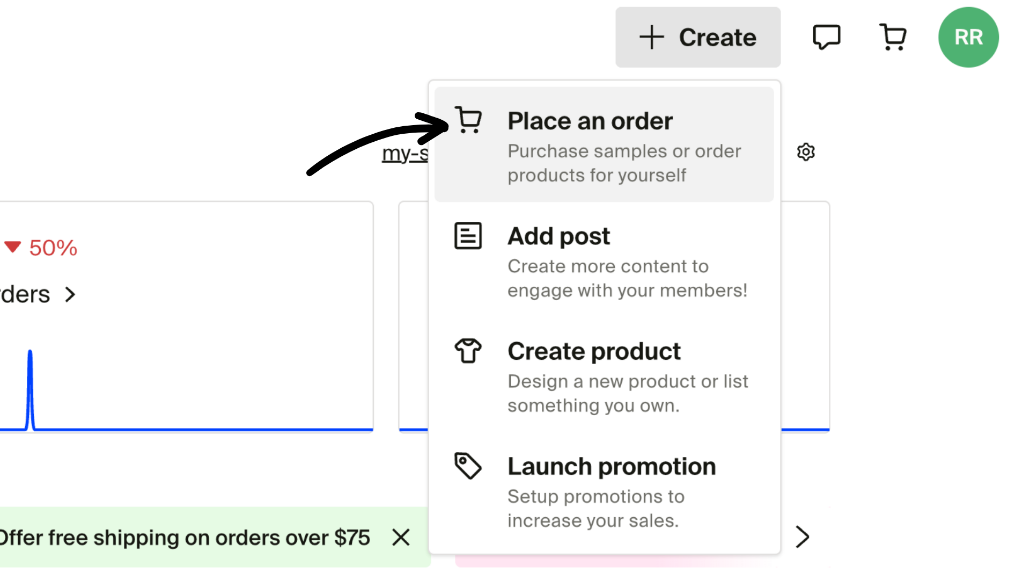
Here are the numbers on a Bella+Canvas 3001 sold at $30. The base leaves $18.25, minus about $1.17 in card processing (2.9% + $0.30), so roughly $17 per shirt. Getting started took four moves:
- Sign up free and pick a tee.
- Upload your design and check the mockup.
- Order a sample of your own shirt.
- Set your price and share the shop link.
Fourthwall’s weak spot is payout timing: money arrives monthly, and only once you pass $25. Printify connects up to 5 stores free; its Bella+Canvas 3001 lands near $10 plus about $5 US shipping, and Premium ($39 a month) cuts up to about 20%.
How Much Does Fourthwall Cost?
You pay nothing until a buyer orders:
| Item | Price |
|---|---|
| Free plan | $0 a month |
| Pro plan (optional, not needed for tees) | $15 a month |
| Gildan 5000 base | from $9.50 |
| Bella+Canvas 3001 base | from $11.75 |
| Percentage fee on catalog tees | None |
| Card processing | 2.9% + $0.30 |
| Payout threshold | $25, paid monthly |
Best for: a design friends keep asking to buy, in any size, anywhere. Skip if: you’re handing 20 shirts to one group in one room.
Printful: Recommended for an Existing Store
Choose Printful if you already sell through Shopify, Etsy or WooCommerce. It integrates with all three, so you can use your existing store rather than open a separate Fourthwall shop.
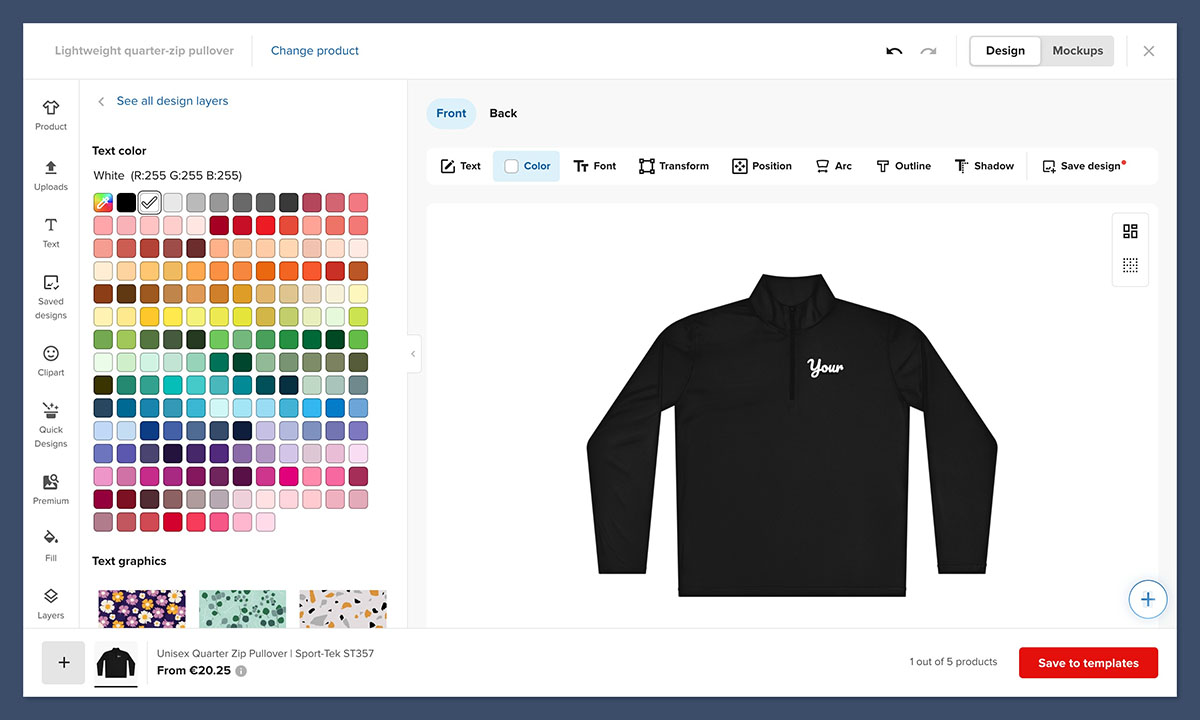
Printful has a free version with no required monthly subscription, no setup fee and no minimum order. You can start without committing to a paid Printful plan. Any fees charged by your store platform are separate.
Free to start does not mean free fulfillment. You pay the product and printing cost, shipping and applicable taxes per order. The shirt cost depends on the product, so check Printful’s costs before setting your selling price.
Keep cash available for connected-store orders. Your customer pays you through your store, while Printful charges you separately for fulfillment, shipping and tax. You may need to cover those charges while waiting for your platform payout, so don’t budget as though customer money is immediately available.
No existing store? Printful’s free standalone Quick Stores is another option, but only for US merchants and US delivery. It offers simple customization and no custom domain.
5. Order a One-Off (Custom Ink or a Local DTG Shop): Best for One Shirt, Zero Gear
- One-off pricing: Custom Ink digital print about $29 to $32 for one shirt with free standard shipping; a local shop charges $20 to $40 for one DTG shirt, no setup fee
- Standout feature: photo-quality single shirts without buying a $10,000+ printer
- Comparing shops? See our list of the best Custom Ink alternatives
Ordering is the best option for one shirt with zero gear because a DTG shirt from a shop costs $20 to $40, while the printer behind it costs $10,000 to $70,000. Custom Ink’s digital print has no minimum, so one shirt is a normal order.
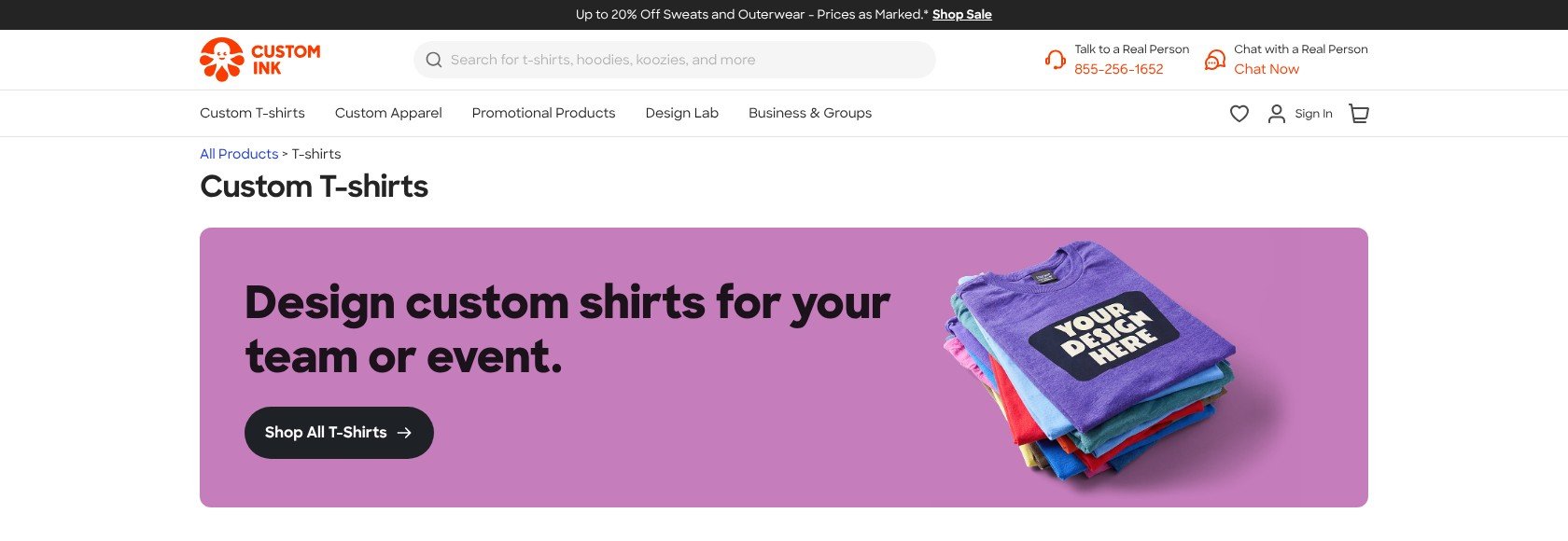
However, $29 to $32 is three to four times what a home DTF shirt costs, so DTF transfers (#1) win as soon as you make more than one or two.
- No minimum (Custom Ink digital print)
- Free shipping on one item (Custom Ink standard shipping)
-
No setup fee (local DTG shop)
-
Highest per-shirt cost ($20 to $40 for one shirt)
- Minimums on other methods (Custom Ink screen printing and embroidery)
- Durability is shop-dependent (no wash rating to lean on)
What’s new with one-off orders?
Custom Ink’s no-minimum digital print covers t-shirts, sweatshirts, tanks and baby bodysuits from a single item, and its Design Lab shows the exact total before you pay.
Why order a one-off in 2026?
DTG is the one method you should never buy for home use, because the printer costs $10,000 to $70,000. Need one photo shirt by Friday? Order it.
One-off order: what to expect
A single shirt in Custom Ink’s Design Lab prices at about $29 to $32 with free standard shipping, and local shops typically quote $20 to $40 for one DTG shirt with no setup fee. The weak spot: Custom Ink’s screen printing and embroidery carry minimums, so only the digital print works for one shirt.
How Much Does a One-Off Shirt Cost?
| Option | Price |
|---|---|
| Custom Ink digital print (one shirt) | about $29 to $32, free standard shipping |
| Local shop, one DTG shirt | $20 to $40, no setup fee |
| Buying your own DTG printer | $10,000 to $70,000 |
Best for: one photo shirt with no gear and no learning curve. Skip if: you need more than two shirts.
6. Screen Printing Kit: Best for a Dozen Identical Shirts
- Kit pricing: Speedball beginner kits $25 to $70; photo-emulsion kit about $87
- Standout feature: cheap per shirt past 6 to 12 identical shirts
- Key spec: one screen per color
A screen printing kit is the best pick for a dozen identical shirts because the screen is reusable and each extra print costs little. It’s worth it at a dozen, not at one.
However, you need one screen per color plus messy cleanup, and DTF transfers (#1) handle multicolor art without any of it.
- Cheap starter ($25 to $70 kit)
- Durable prints
-
Low cost per shirt (past 6 to 12 identical shirts)
-
One screen per color
- Hard and messy (cleanup after every session)
- Pointless for one shirt
What’s new with screen printing kits?
Speedball’s range runs from $25 to $70 beginner kits to a photo-emulsion kit at about $87 and an intermediate kit at about $239, so you can start small and add screens later.
Why use a screen printing kit in 2026?
Six to 12 identical one-color shirts for a club or a team is the sweet spot. Past that, a local screen printer is worth a quote: 12-shirt minimums are common, plus $15 to $25 setup per color.
Screen printing: what to expect
A Speedball beginner kit covers a one-color design, and once the screen is ready each extra shirt costs little. The weak spot: every color needs its own screen, plus messy cleanup after every session.
How Much Does a Screen Printing Kit Cost?
| Item | Price |
|---|---|
| Speedball beginner kit | $25 to $70 |
| Photo-emulsion kit | about $87 |
| Local screen printer setup | $15 to $25 per color, 12-shirt minimums common |
7. Fabric Paint and Freezer-Paper Stencil: Best No-Machine Craft
- Supply pricing: under $15 in supplies; about $3 to $5 per shirt, blank included
- Standout feature: no machine, no printer, no heat press
- Key spec: dry overnight to 24 hours, then heat set per the paint label
Fabric paint is the best no-machine craft because a freezer-paper stencil, a sponge brush and under $15 of supplies are all you need. It’s ideal for kids’ projects.
However, you’re limited to one color and simple shapes, and the paint label decides the wash life. For multicolor art, DTF transfers (#1) are faster.
- Cheapest supplies (under $15)
- No machine needed
-
Kid-friendly
-
One color, simple shapes
- Slow (overnight to 24-hour dry)
- Wash life depends on the paint label
What’s new with fabric paint?
The method hasn’t changed, and that’s the appeal: supplies still cost under $15, and the only skill to learn is dabbing instead of brushing.
Why use fabric paint in 2026?
A rainy-afternoon craft with kids needs no cutter, printer or press. Plus, the result is one of a kind.
How to paint a shirt with a stencil
Iron the freezer-paper stencil shiny side down and slip a second sheet inside the shirt. Dab thin coats with a sponge brush, dry it overnight, peel the stencil, then heat set it per the paint label. The most common mistake: brush strokes push paint under the stencil edge, so dab, don’t brush.
How Much Does Fabric Paint Cost?
| Item | Price |
|---|---|
| Paint, freezer paper, sponge brush | under $15 |
| Per shirt (blank included) | about $3 to $5 |
8. Sublimation: Best for Polyester Sports Shirts
- Printer pricing: $180 to $700 before ink (Epson F170 about $399, Sawgrass SG500 about $499 to $700)
- Standout feature: the dye becomes part of polyester, so the print has no feel at all
- Key spec: polyester blanks only
Sublimation is the best pick for polyester sports shirts because the dye becomes part of the fabric, so there’s no film and no hand-feel. It’s a printer habit, not a shirt method.
However, on cotton it fades to a ghost after a few washes, so for a cotton tee DTF transfers (#1) are the right call.
- No hand-feel (dye bonds into polyester)
- Permanent on polyester
-
Doubles for mugs
-
Polyester only (fades to a ghost on cotton)
- Printer cost ($180 to $700 before ink)
What’s new with sublimation?
Converted EcoTank printers have pulled the entry price down to about $180 to $300 plus sublimation ink, below the Epson F170 at about $399.
Why use sublimation in 2026?
If you already make mugs or run a sports team on polyester shirts, sublimation gives you a print with no feel at all. Otherwise, the printer won’t pay for itself on t-shirts.
Sublimation: what to expect
On polyester the print has no feel at all. The weak spot: the same design on a cotton shirt fades to a ghost after a few washes, so keep it for sports shirts and mugs.
How Much Does Sublimation Cost?
| Item | Price |
|---|---|
| Converted EcoTank | about $180 to $300 plus ink |
| Epson SureColor F170 | about $399 |
| Sawgrass SG500 | about $499 to $700 |
How Do I Choose the Right Way to Make a Custom T-Shirt?
Pick the method from the design, not the gear: full color points to DTF, a name points to HTV, and a photo on a white shirt points to inkjet paper. Then check how many shirts you need and whether anyone wants to pay for one.
Ask yourself these 6 questions:
- Is my design full color, or one or two solid colors?
- Is the shirt dark or light?
- How many shirts do I need, and in how many sizes?
- Do I need it tonight, or can I wait for shipping?
- How many washes does it have to survive?
- Will people want to pay me for one?
Iron or Heat Press?
Most first shirts fail because of the setup, not the design: a padded ironing board, steam, or a blank that shrinks after pressing. Start with the blank:
- Gildan 5000: 5.0 to 5.3 oz cotton, the cheap workhorse. A 12-pack of Gildan crafting tees at Walmart runs about $35.64, or $2.97 a shirt
- Bella+Canvas 3001: 4.2 oz ring-spun cotton, softer and pre-shrunk, the one that feels retail. Blanks start around $4.28 at Ninja Transfers and run $8 to $10 in stores
Then prep it:
- Pre-wash the blank without fabric softener so it shrinks before pressing.
- Pre-press for 2 to 3 seconds to drive out moisture and wrinkles.
- Use a hard surface: a wooden table with a towel on it, never an ironing board.
- Empty the iron and turn steam off, because moisture breaks the bond.
- Put parchment or a Teflon sheet on top, and slip a sheet inside the shirt to stop bleed-through.
| Tool | Price (2026) | When it’s worth it |
|---|---|---|
| Household iron | $0 (you own it) | 1 to 5 shirts, small designs |
| Cricut EasyPress Mini | About $39 | Small designs, sleeves, kids’ sizes |
| Cricut EasyPress 3 (9×9) | About $89 | Regular makers who want even heat on chest designs |
| 15×15 press (VEVOR $299.99, Cricut AutoPress 2 $349, HPN CraftPro $449.95) | $300 to $450 | Batches of 20+ |
| HTV cutter (Cricut Joy Xtra about $149, Maker 4 from about $349) | $149 to $349 | Only if you choose HTV |
An iron’s center can sit at 336°F while its edges hover near 290°F, so press big designs in sections. That said, a $300 press costs as much as ten outsourced shirts at about $30 each. I recommend the iron for your first five shirts and the EasyPress 3 once you press monthly.
When Should You Switch to Print on Demand?
At 20 shirts, home DTF is still the cheapest per shirt. What changes is your cash, your sizes and your weekend. Watch for three signals:
- People want to pay you for the shirt
- You need a size run (S to 2XL and up) that you’d have to guess and pre-buy
- Shipping to people in different cities becomes the job
Here’s our math on the same 20 shirts three ways:
| Home DTF | Local screen printer (1 color) | Fourthwall | |
|---|---|---|---|
| Your upfront cash | About $150 to $180 (22×120 sheet $89.99 holds about 24 designs at 10×10 inches, plus $60 to $90 of blanks) | About $165 to $195 ($80 printing, about $25 setup, $60 to $90 blanks) | $0: each buyer orders and pays for their own shirt |
| Cost per shirt | About $7.50 to $9 | About $8.25 to $9.75 | $9.50 (Gildan 5000) or $11.75 (Bella+Canvas 3001) base, taken from the price you set |
| Your time | Pressing all 20 (about 3 to 5 minutes a shirt, our rough estimate) | Collecting sizes and picking up | None |
| Sizes | Buy blanks per size up front | 12-shirt minimums common; size upcharges possible | Each buyer picks their own |
| Shipping to others | You do it | You do it | Fourthwall ships each order, buyer pays shipping (US: roughly 7 to 10 days) |
| Best when | One group, one handoff, you enjoy pressing | Identical one-color shirts, one location | People pay for their own shirt, any size, anywhere |
The screen printer column assumes $4 a shirt for one color plus one setup fee; quotes vary by shop. If two or three signals apply, Fourthwall (#4) turns a size spreadsheet into a shop link. Printful is an alternative for an existing store, but budget for fulfillment while awaiting platform payouts. The table’s POD figures are a Fourthwall example, not Printful pricing.
How Do You Make a Homemade Shirt Last?
The shirt that looked perfect at the party and peeled in the first wash was decided in its first 24 hours. Follow five care rules:
- Wait 24 hours before the first wash. Vinyl, DTF and transfer paper all need it
- Wash inside out in cold water with mild detergent
- Skip fabric softener and bleach. Avery warns softener can cause fading, cracking or peeling
- Air dry or tumble low
- Never iron directly on the print. Iron inside out or over parchment
| Problem | Likely cause | Fix |
|---|---|---|
| HTV edges lift after the first wash | Skipped the second press, or under-heated | 10-second second press under parchment; test on scrap first |
| Cracking | Blank not pre-washed, or DTF under-cured, overheated or peeled at the wrong time | Pre-wash the blank; follow the film’s hot- or cold-peel instruction |
| Shiny, brittle vinyl or a scorched shirt | Too hot (irons can reach about 400°F) | Stay at 300 to 320°F for HTV and about 310°F for DTF |
| Patchy adhesion | Uneven iron heat (336°F center, about 290°F edges) or a soft surface | Press in sections on a hard surface; consumer presses can read 15 to 30°F low, so check with an infrared thermometer |
| Faded transfer-paper print | Normal wear past about 20 washes, or softener | Cold wash, no softener; use DTF next time |
| Paint bleeds under the stencil | Brushed instead of dabbed | Dab thin coats, put a second freezer-paper sheet inside, dry 24 hours before peeling |
Most failures trace back to heat, pressure or washing too soon, so test a new vinyl or transfer on a scrap shirt before your gift shirt.
How We Compare and Rank T-Shirt Methods
We compared 8 ways to make a custom t-shirt, from a household iron and a $3 sheet of transfer paper to ordering a single DTG print. For each one, I worked out the upfront gear, the per-shirt cost with a $3 to $4.50 blank, the manufacturer’s press settings, the peel and the wash care, including the 24-hour wait and cold, inside-out washes. Prices are 2026 figures.
Each category carries a weight that reflects what a first-time maker cares about:
- Ease for a beginner (30%): We count the steps that can go wrong on a kitchen table, such as mirroring, weeding and peel timing.
- Cost per shirt and upfront (25%): We add the blank, the consumables and any gear you must buy before shirt one.
- Wash durability (20%): We follow each maker’s care rules and use the brand’s own wash rating where one exists (Avery 20, Ninja Transfers 100+).
- Design flexibility (15%): We check full color, dark shirts, photos and how many colors each method handles.
- Time per shirt (10%): We time the press, dry and shipping wait for each method.
DTF transfers came out on top because ease and cost carry 55% of the score, and a $0 iron setup with a 100+ wash rating beats every other full-color method. HTV edged inkjet paper on design flexibility, because it cuts crisp text for dark shirts, despite the $149 cutter.
Final Verdict: Which T-Shirt Method Do I Recommend?
DTF transfers are my pick for most first-time makers. A 22×24 sheet at about $17 to $29, an iron at about 310°F and a hard table get you full color on any shirt, rated for 100+ washes.
I know DTF won’t fit every project: HTV is cleaner for a name, and inkjet paper is faster for one photo shirt tonight. If friends are asking to buy, set up a free Fourthwall shop and send them the link instead of a size spreadsheet. If you already run a Shopify, Etsy or WooCommerce store, I recommend Printful instead, with cash set aside to cover fulfillment before platform payouts.
FAQs
What is the easiest way to make a custom t-shirt at home?
Press a pre-printed DTF transfer with a household iron for full color on any shirt. Use HTV for names and simple logos, or inkjet transfer paper if you want to spend almost nothing. Our comparison table lines up all eight methods.
Can I use a regular iron instead of a heat press?
Yes, for a few shirts. Work on a hard surface with steam off, use the hottest cotton setting for paper and vinyl or about 310°F for DTF, and press firmly without sliding. A heat press gives more even heat on big designs and batches; the Iron or Heat Press section covers when one pays off.
Do I need to mirror my design?
Mirror it for HTV and for Avery light-fabric transfer paper. Don’t mirror Avery dark-fabric paper or printed DTF gang sheets, which you upload the right way round. A forgotten mirror on vinyl means a backwards shirt and a wasted foot of material.
How many washes will a homemade shirt last?
Avery guarantees its transfer paper for 20 washes, and Ninja Transfers rates its DTF for 100+. HTV and fabric paint carry no manufacturer count, so their life depends on your press and your care: a 24-hour wait, cold water, inside out, no softener. The troubleshooting table above lists the fix for each failure.
Can I order just one custom shirt without making it?
Yes. Custom Ink’s digital print has no minimum and costs about $29 to $32 with free shipping on one item. A local shop charges $20 to $40 for one DTG shirt, and Fourthwall lets you order a sample of your own design from a free account.
Do I need a Shopify or Etsy store to sell my shirt with print on demand?
No. Fourthwall gives you a free storefront and handles printing, shipping and sales tax. Printful integrates with Shopify, Etsy and WooCommerce, but integration is not mandatory: its free standalone Quick Stores is available only to US merchants for US delivery, with simple customization and no custom domain. The switch section above compares the options.
Bogdan Tudorancea, Editor at Bootstrapping Ecommerce