
When I first started experimenting with TikTok Shop and Printful, I couldn’t find a clear guide that covered both the direct integration and the Shopify fallback.
So I wrote this based on what actually worked for me: step-by-step, region-specific, and updated for the current tools available.
Here’s exactly how I set up TikTok Shop with Printful, got my listings live, and avoided the most common errors.
Whether you’re in the US or UK (the only supported regions for this direct integration), this guide will walk you through the process.
Step 1: Make Sure You’re Eligible
Before you jump into setup, TikTok and Printful both have some basic eligibility requirements you’ll need to meet.
TikTok Shop Eligibility Checklist:
- You must be located in the US or UK
- You need a TikTok Shop Seller account
- Your account must pass identity verification
- A linked bank account is required to receive payouts
You can sign up for TikTok Shop Seller Center at TikTok Seller Center. Just make sure you select the correct region when registering.
Printful Requirements:
- You need a Printful account
- Your Printful store must be able to fulfill orders to US or UK customers
- You’ll use Printful’s warehouse address for fulfillment and returns
If you’re not in the US or UK, skip down to the Shopify fallback option.
Step 2: Create Your TikTok Shop Seller Account
This part is all about setting up your business properly within TikTok’s system. It’s straightforward, but don’t skip any verification steps or your store won’t go live.
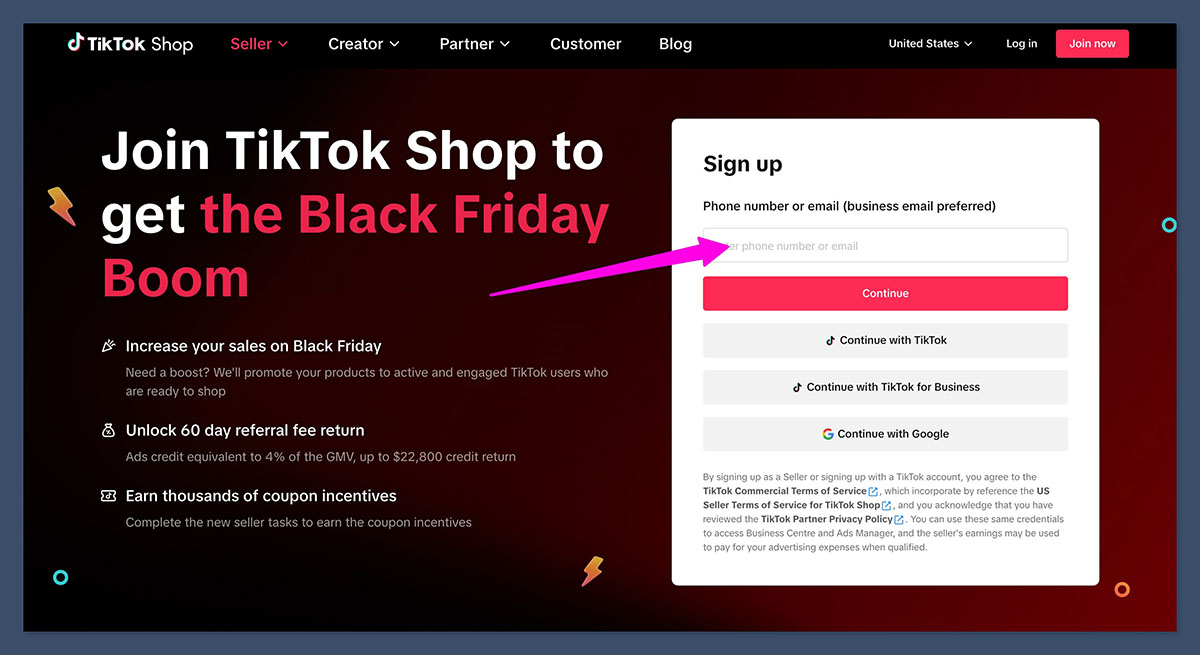
Here’s how I completed the process:
TikTok Seller Center Setup
- Go to TikTok Shop Seller Center
- Select US or UK as your region
- Choose between an Individual or Business account
- Submit your government-issued ID and business details
- Add a US or UK bank account to receive payments
It usually takes 24 to 48 hours for TikTok to verify your identity and approve your seller account.
Step 3: Set Warehouse, Pickup, and Return Addresses
TikTok requires you to add a warehouse and return address for logistics purposes, even if you don’t handle fulfillment yourself.
Luckily, Printful gives you fulfillment center addresses you can use. You’ll want to enter these into TikTok Seller Center so orders are routed correctly.
Example Addresses from Printful:
| Region | Facility Location | Address (Example) |
|---|---|---|
| US | Coppell, Texas | 1960 W. Bethel Rd., Coppell, TX 75019 |
| UK | Wolverhampton | Pendeford Business Park, Wolverhampton, WV9 5HA |
Make sure your return address matches the warehouse address. This keeps things smooth in case of returns.
To update your warehouse and return address in TikTok:
- Go to Seller Center > Settings > Warehouse and Return Address
- Add Printful’s US or UK fulfillment location
- Save changes
Step 4: Install the Printful App in TikTok Shop
Here’s where the actual integration happens. You don’t need to mess around with third-party middleware, Printful has a native app for TikTok Shop.
How to Install:
- Go to the TikTok Shop App Store inside your Seller Center
- Search for Printful
- Click Install
- Follow the on-screen prompts to connect your TikTok Shop to Printful
Once it’s connected, you’ll be able to push products directly from Printful to TikTok Shop. No manual uploads required.
This sync setup will also send tracking info from Printful back to TikTok when an order is shipped.
Step 5: Update TikTok Shipping Settings (Critical Step)
If you skip this part, your orders won’t be fulfilled correctly. TikTok has two fulfillment options:
- Shipped by Platform (default)
- Shipped by Seller (required for Printful)
You must change it to “Shipped by Seller” or TikTok will expect to fulfill the order themselves, which breaks the integration.
How to Change Shipping Settings:
- In TikTok Seller Center, go to Orders > Shipping Settings
- Turn off “Shipped by Platform”
- Turn on “Shipped by Seller”
Set Up a Shipping Template
TikTok requires you to have at least one active shipping template. You can create this easily:
- Go to Shipping Templates
- Choose either weight-based or item-count-based pricing
- Set your regions, costs, and delivery estimates
You can match these with Printful’s standard delivery times and rates. For example:
| Region | Method | Delivery Time | Cost |
|---|---|---|---|
| US | Standard | 3–7 business days | $4.99 |
| UK | Standard | 3–5 business days | £3.99 |
Be realistic here — TikTok expects sellers to meet service level agreements. If you overpromise on delivery times, your store can be penalized.
Step 6: Create and Sync Products from Printful
Once your shop is set up and connected, it’s time to actually list your products.
Inside Printful:
- Go to your Printful dashboard
- Click Stores > TikTok Shop
- Choose Add Product
- Select a product from Printful’s catalog (t-shirts, hoodies, mugs, etc.)
- Upload your design
- Set pricing and mockups
- Publish the product to TikTok Shop
Printful automatically checks regional eligibility. You’ll only be able to push products that are allowed in your TikTok Shop region.
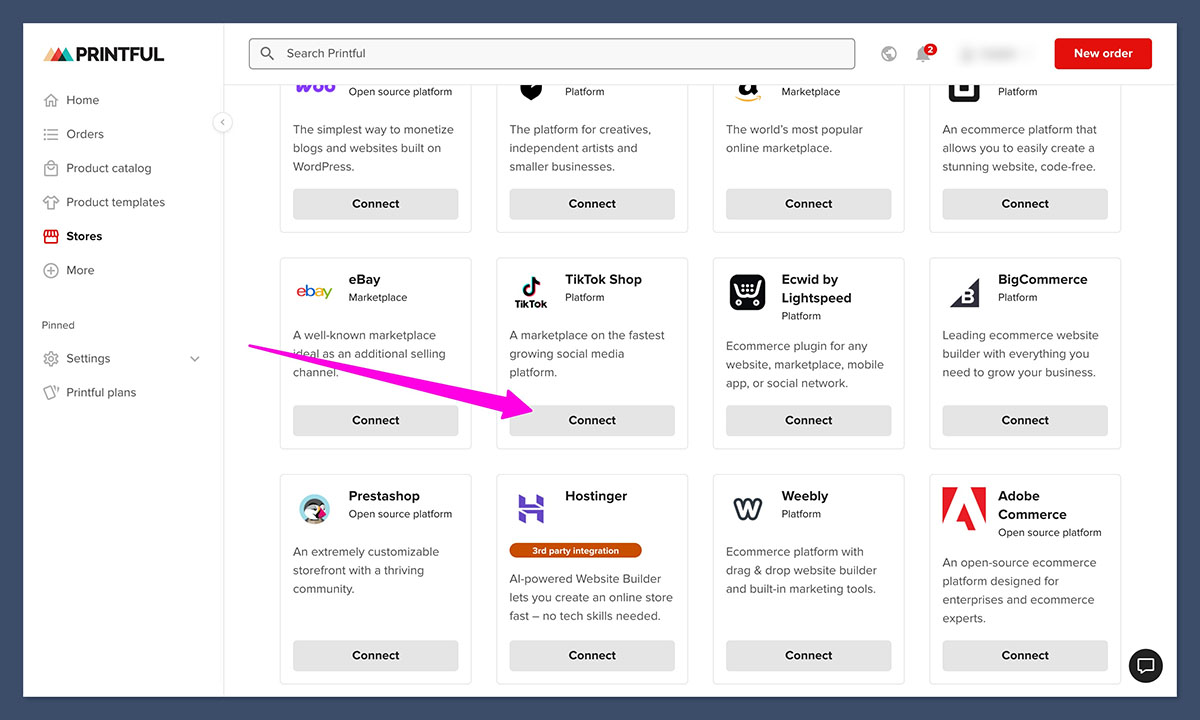
I started with standard apparel items like t-shirts and hoodies, since those had predictable shipping times and were less likely to trigger TikTok rejections.
Step 7: Optimize Your Listings for TikTok’s Standards
TikTok is stricter about product listings than you might expect. If your listings don’t meet their guidelines, they won’t show up — even if everything is technically set up correctly.
Listing Requirements to Follow:
- At least 5 product images (front, back, angled views)
- Images must be clear, accurate, and match the product
- Descriptions should include material, size, and key details
- Avoid logos or watermarks that aren’t part of the product
- Use the correct category and attributes
I used Canva to create clean mockups that looked good on mobile and met TikTok’s image quality guidelines.
To check if your listings meet the standards, compare with TikTok’s product listing guide
Step 8: Test Your Setup
Before driving any traffic or running ads, I strongly recommend placing a test order. This helps you confirm:
- Orders are syncing from TikTok to Printful
- Fulfillment is starting automatically
- Tracking numbers are being sent back to TikTok
You can either:
- Use a separate account to buy from your own store
- Ask a friend to purchase a low-cost item
Once you see a smooth order flow, you’re ready to start scaling.
Common Issues and How to Fix Them
Even when you follow the steps, some issues might pop up. I ran into a few and here’s how I handled them.
Products Not Showing Up on TikTok Shop
This usually happens because:
- The product doesn’t meet TikTok’s shipping or SLA standards
- Your product images or categories are incomplete
- You haven’t turned on “Shipped by Seller”
Double-check your product listing inside TikTok Seller Center. If it’s marked as “pending” or “under review,” you may need to update the listing or contact support.
Can’t Push Products from Printful
If Printful isn’t letting you push a product, it’s likely:
- That product isn’t eligible in your selected region
- Printful has temporarily blocked that product type from TikTok (usually for SLA reasons)
- Your integration connection needs to be refreshed
Log into Printful, go to Store > TikTok Shop > Settings, and reauthorize the connection if needed.
What to Sell First on TikTok Shop via Printful
If you’re not sure where to start, here are some product types that tend to perform well on TikTok and also work seamlessly with Printful’s setup:
Best Product Types:
| Product Type | Reason It Works |
|---|---|
| T-shirts (DTG) | Fast production, low cost |
| Hoodies and Sweatshirts | High perceived value |
| Hats and Beanies | Lightweight, easy to ship |
| Mugs | Low-risk intro product |
| Tote Bags | Popular with younger TikTok audiences |
Printful also recommends sticking with DTG or embroidery items at first since they meet TikTok’s delivery requirements more consistently than all-over-print or specialty items.
Option B: Set Up TikTok Shop via Shopify + Printful
If you’re located outside of the US or UK, or if you prefer to manage everything through Shopify, here’s the fallback route I tested.
Step-by-Step Overview:
- Set up a Shopify store and connect it to Printful using the official app
- Install the TikTok channel app inside Shopify
- Connect your TikTok for Business account
- Sync your Shopify products to TikTok
- Use Shopify’s tools to manage orders and send data back to Printful
Why Use Shopify?
- Shopify provides more flexibility for global sellers
- You can still sell on TikTok Shop even if you’re outside US/UK
- You get full access to TikTok ad tools, analytics, and pixel tracking
The only drawback is that it’s slightly more complex and adds $39/month minimum for the Shopify plan.
Final Thoughts
Setting up TikTok Shop with Printful isn’t hard once you understand the workflow, but it is picky. If you miss one step (like enabling “Shipped by Seller”) the whole system breaks down.
Once your integration is live, though, you’re opening up to one of the lowest-cost traffic sources in ecommerce right now. TikTok is driving massive conversions, especially for custom apparel, accessories, and trend-based products.
Start with a basic product line, test the flow, then scale your listings gradually. And don’t be afraid to use the Shopify workaround if the direct integration isn’t available in your area.



