Selling merch on YouTube seems like one of those ridiculously simple things these days. You don’t need to worry much about store design or attracting an audience when you’re offering products directly on one of the world’s most popular websites. With print on demand, you don’t even have to handle production and fulfillment yourself.
Add that to the fact that YouTube’s shopping channel has grown in volume by 5 times year over year, and you can probably see why so many people have started paying attention.
Still, that doesn’t mean there aren’t tricky parts to get your head around; there definitely are. That’s one of the reasons I recommend Fourthwall for this whole process; it takes a lot of the work off your shoulders. More on that later, for now, let’s jump straight in.
First: Check Whether You Can Use YouTube Shopping
Too many merch guides skip straight to product ideas, then creators find out halfway through that the shopping features they were counting on aren’t even available for their channel.
First thing you should know is that YouTube’s Expanded Partner Program does give you the option to promote your own products if you have 500 subscribers, 3 public uploads from the last three months, and either 3,000 public watch hours in the last year or 3 million Shorts views in the last 90 days.
If that bar’s still too high for you, relax. You can still sell merch with Fourthwall and YouTube Merch Shelf without joining the partner program.
There are some pretty great examples of sellers already using Fourthwall, actually. Harry Mack launched his “Anomaly Tour Collection” in 2025 with Fourthwall. Charlotte Dobre ran the “Stay Petty” collection, and Phillip DeFranco launched a full empire under his own brand.
How to Sell Merch on YouTube The Easy Guide
Alright, let’s get into the grit of it. The first thing you’re probably going to niche is the same thing every other print-on-demand or creator-economy focused article recommends: a niche. If you already have a YouTube channel, you’ve probably already defined that.
If you’re really new, my advice is to go narrow. You don’t just want “gaming” as a niche; you want something that defines the overlap between your audience’s identity and your tone. Look for recurring patterns in what people say about you in comments, livestream chats, community posts, and Reddit forums. That’s a good place to start.
Hailee and Kendra, for instance, build their niche around pride, humor, and inclusivity. Once you’ve ironed that out, you’ll have a much better idea of what you should be selling.
Step 1: Come Up With Merch Ideas That Fit Your Audience
This is honestly a lot easier than some people make it out to be. The “classics” tend to work well on YouTube. Most big stars sell:
- T-shirts
- Hoodies and crewnecks
- Hats and beanies
- Stickers and magnets
- Mugs and tumblers
- Desk mats and mouse pads
Usually, it’s a good idea to start pretty small, with low-cost products that people don’t argue with buying: stickers and phone cases for instance. Once those start selling consistently, you can get a bit more experimental, with niche merch ideas like collectible pins or limited edition posters.
Just don’t rush in too fast, and always validate before you build too much. That doesn’t have to mean running a whole market research experiment. Just put your feelers out:
- Run a YouTube community poll
- Ask Discord members to choose between two concepts
- Test hoodie vs tee, or mug vs desk mat
- Post mockups on Instagram Stories
- Collect waitlist signups if you want a cleaner signal
The great thing about validation is it can double as “launch prep,” initially helping you to get people interested in your products before you even start selling.
Step 2: Start Designing Products
Now you need actual designs for whatever you’re going to sell. There are a few ways to go about this, really. You can even consider hiring artists to do the hard work for you. Whatever avenue you pick though, it’s important to build around your channel identity.
Fans will connect better with designs that feel relevant to the personality of your content. Pulling inspiration from your channel’s logo, color palette, or even inside jokes gives you a great launch point. You can also:
- Ask your customers what they’ll actually buy, what colors they like, and what designs they like most with YouTube polls.
- Experiment with design tools like Canva, or get AI to generate some interesting images for you.
- Check out some examples from other YouTube merch sellers. Check out what gets the most reviews and comments.
Remember, keep the designs simple and wearable as much as you can. Too much chaos can drive customers away, and make it harder to convert your customers.
If the design only works because the buyer feels loyal to you, it’s probably weak. If it works because it feels personal, polished, and genuinely wearable or usable, you’re in much better shape.
Step 3: Set Up Your Store With Fourthwall
Now there are a lot of different ways to sell through YouTube, but I think Fourthwall is the best option for a few reasons. It’s extremely easy to use, gives you hundreds of premium products to choose from straight away, and there are zero upfront costs.
Plus, it integrates with YouTube directly, and give you the option to expand into new areas, like selling memberships or digital products whenever you like.
So, here’s how the setup works.
Start the store and set the basics
Create your Fourthwall account for free, claim your store name, and get the basic storefront in place. You don’t need a super impressive website at this point. I’d probably start with:
- The homepage
- An about page
- An FAQ
- A contact or support page
- Your logo, colors, and banner image
Also, make sure you have payments figured out in advance.
Build a small first collection
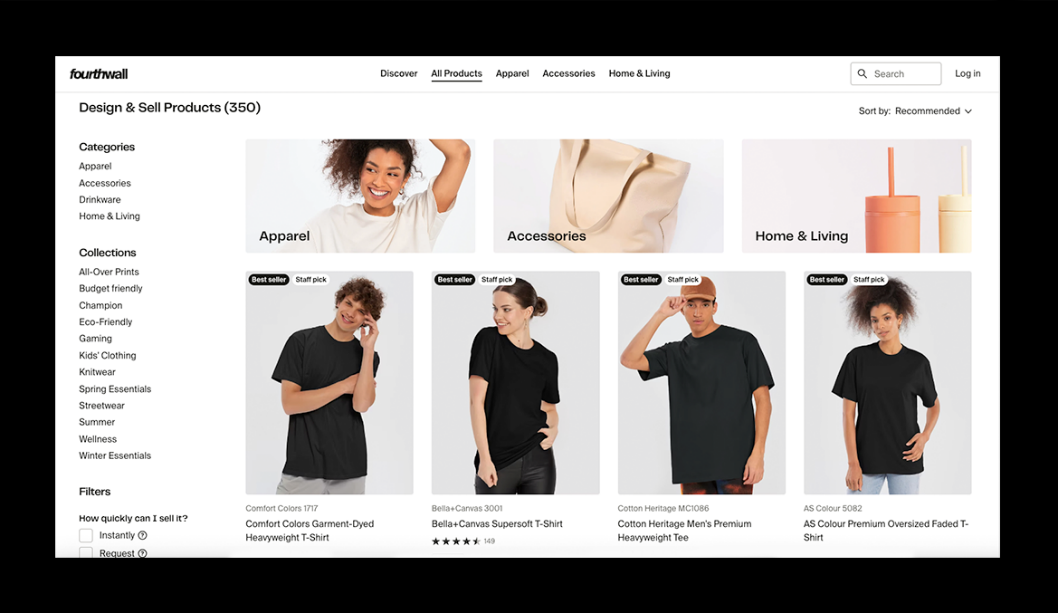
Small is the word you should be really paying attention to here. Fourthwall gives you about 300 products, but it really makes sense to start with just a handful of things. Maybe one main apparel item, one premium item, and a low-cost add-on like stickers or magnets. You could also add in something practical, like a tote bag.
Build the bundle around your channel identity:
- Commentary creator: tee, mug, sticker, hoodie
- Gaming creator: hoodie, desk mat, cap, sticker
- Personality-led creator: phrase tee, sweatshirt, mug, small drop item
Once you pick your products, you can use Fourthwall’s mock-up tool to see what your designs are going to look like before you start shipping them out.
Add The Products And Set Prices As You Go
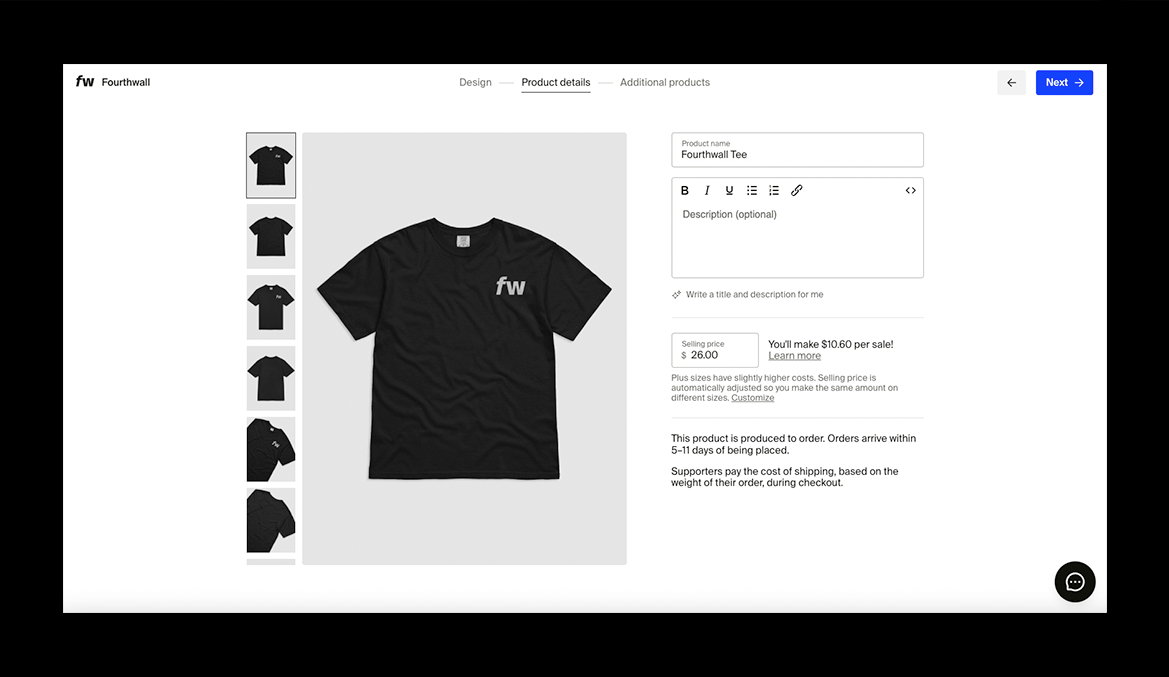
Fourthwall shows you the “base cost” of everything you’re going to be selling straight away, so this should be pretty straightforward. My advice is to stick to a basic profit margin. If you’re not sure what most products sell for, check out a few competitors.
Don’t just “underprice” them to stand out; find out what makes sense to your customers.
One helpful thing to keep in mind is that Fourthwall’s products are more “premium” than a lot of the options you’ll find elsewhere, so you might be able to charge a little more than you would for a product from Printify or Redbubble.
Build the Product Pages Properly
Again, this doesn’t have to be a huge project; just make sure the basics are there.
Each listing should have:
- A clear title
- A short description
- Strong mockups or images
- The right sizes or dimensions
- The correct color and variant options
You can see the difference this makes in actual Fourthwall stores. Charlotte Dobre’s mug page, for example, includes size options, exact dimensions, dishwasher and microwave notes, and manufacturer details. It’s simple, but it’s also complete.
Connect The Store To Youtube
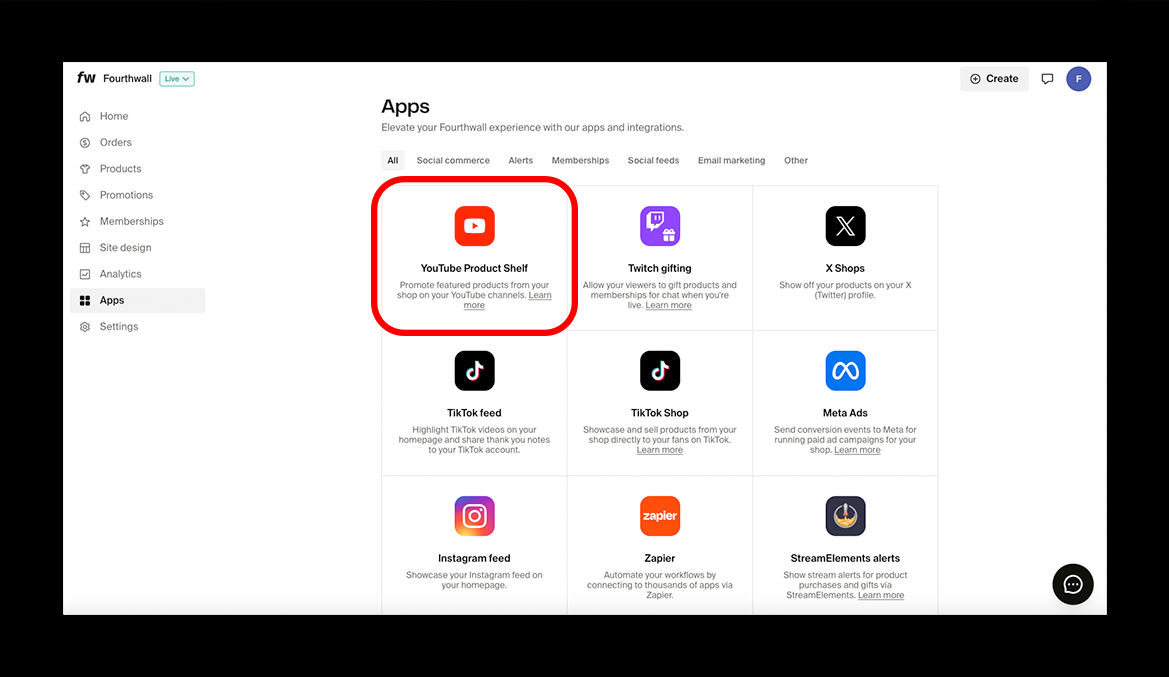
Next, you link your store to YouTube. Nothing tricky here, just head to your Shop Settings in the Fourthwall dashboard, and click on “Apps” followed by “YouTube Product Shelf”.
A configuration screen will open up, asking you to log in to the Google account connected to your YouTube channel. Do that, and grant Fourthwall permission to access your account. Don’t worry, it won’t save any private data.
Once you’re connected, you’ll see a pending status as Google reviews your products. After about 48 hours, you should be ready to sell. That means:
- Adding your shop to YouTube Studio (in the Monetization menu, under “Shopping”). This only works if your channel is eligible.
- Linking any other YouTube channels you want to connect.
- Making sure you’re ready to accept payments.
Step 4: Plan Your Launch
A lot of people talk about promoting merch, but not many talk about having a launch plan. I actually think a little plan is really helpful. Personally, I’d plan the release around a moment that people were already going to pay attention to, like a livestream, a milestone, or a big upload.
Pick the products that are going to lead the launch. Usually, one to three “hero” products is enough: maybe the item most likely to sell, the most unique item, and the most premium item.
Then throw together a few launch assets in advance, like:
- Pinned comments
- Updated video descriptions
- A community post
- Discord announcement copy
- Email copy if you use a list
- A few social posts for Instagram, TikTok, or x
- A quick line you can actually say naturally in a video
One other thing, think about how you can give people a reason to buy something straight away. Is this an exclusive, limited-time drop? Are you offering a deal on launch week prices? What would make a customer really eager to get involved?
Step 5: Promote Your Merch Inside Your Content
There are plenty of ways to promote your merch, including blogging, paid ads, social media advertising, and even email campaigns. For me, it makes the most sense to use the system you already have. YouTube Shopping gives creators more than one place to sell:
- The channel shop
- The product shelf
- Product tagging in videos
- Tagged products in shorts
- Shopping tools in livestreams
Take advantage of all of those, and keep track of what gives you the best results.
Another good tip? Split active and passive promotion. Passive promotion might include tagging products in videos or adding a product shelf under your videos. Active promotion might mean collaborating with influencers, wearing your merch in videos, or creating a launch video.
The biggest rule for YouTube creators? Don’t oversell.
If every video turns into a hard pitch, people start tuning it out. If the merch never gets mentioned at all, most viewers won’t notice it. The sweet spot is somewhere in the middle:
- Wear it
- Use it
- Mention it when it fits
- Build a few content moments around it
- Then let the shelf and tags do their job
Step 6: Learn, Optimize, and Scale
The launch tells you whether the merch works for your audience. The next few weeks tell you where to go next. You should be watching the numbers carefully.
Find out which products get clicked on most, which sell the most, which types of content drive sales, and what categories most people leaned towards.
When you start gathering insights, you can use them to plan your next products and collections in small, obvious ways. Maybe you can add a new version of your best-selling item in a different color, or bundle two items that people tend to buy together. Maybe you test a seasonal variation.
The really great thing about Fourthwall here is that it lets you scale outside of obvious print-on-demand merch, too. You can create limited edition pins and plushies for your biggest supporters, or sell digital products and memberships alongside physical items.
That gives you a lot of fun and interesting ways to scale beyond just “designing another t-shirt.”
Even better, Fourthwall handles the stuff that tends to make scaling difficult, too. They deal with customer support for products from their catalog. They also act as your Merchant of Record for tax issues. That saves you a lot of time.
Selling Merch on YouTube With Fourthwall
Selling merch on YouTube is easily one of the best ways to monetize an audience these days. For a lot of creators, the hard part isn’t finding designs; it’s choosing products that fit the audience, making sure your brand survives as you scale, and keeping your customers’ attention where it needs to be.
Fourthwall makes a lot of the process much easier. It’s not just a way to sell on YouTube, it’s a full ecosystem for building a brand that can evolve with your channel.
It takes a lot of the headaches, like setting up apps and integrations, out of the equation, without forcing you to compromise on a fully functional ecommerce experience.
If I were selling merch through YouTube in 2026, Fourthwall is exactly the tool I’d choose to do it with.