
Print on demand removes inventory risk, but it transfers a far harder problem onto your shoulders: quality control over a supply chain you never physically touch. A faded shirt, a crooked logo, or a cracked mug arrives with your brand name on it, not the printer’s.
This guide breaks down how serious POD sellers in 2026 build a quality control system across four pillars: supplier selection, sampling discipline, expectation management, and continuous feedback monitoring.
The print on demand model has matured. Customers no longer accept “made to order” as a blanket excuse for inconsistent prints, off-spec garments, or three-week delivery windows. They expect personalization, sustainability, and a quality bar close to retail, and they will pay a premium for sellers who deliver it. The sellers who win in this environment treat quality control as an operational system, not a reactive fix when complaints pile up.
This article walks through the practical mechanics: how to vet suppliers, how to sample properly, how to spot quality drift before it costs you revenue, and how to build redundancy so a single printer’s bad batch doesn’t sink your store.
Key Takeaways
- Quality control in POD spans four pillars: supplier selection, sampling, expectation management, and feedback monitoring. Skipping any one of them creates predictable failure modes.
- Different print methods (DTG, sublimation, embroidery, UV) fail in different ways, so part of quality control is matching the method to the product rather than defaulting to one supplier.
- Ordering samples for every new product and resampling every few months is the only reliable way to catch unannounced changes in blanks, inks, or print setups.
- Return rates above 2 to 3 percent or a spike in any single defect category should trigger investigation, not absorption as a cost of doing business.
- Backup suppliers and mirrored listings for bestsellers reduce downtime risk during peak seasons or sudden quality degradation from a primary partner.
- Customer feedback, structured by defect type, is your most scalable quality control instrument. Photo reviews effectively turn customers into a distributed inspection team.
Why Quality Control Is the Core Risk in Print on Demand
Because POD outsources production and fulfillment, your brand reputation depends entirely on third-party print providers you never physically see. Problems like poor print quality, misaligned designs, slow shipping, or damaged deliveries lead directly to refunds, negative reviews, and customer churn. None of those costs sit with the printer. They sit with you.
At the same time, customer expectations are rising. Shoppers want fast, flexible, personalized products and increasingly favor sustainable options, with a willingness to pay more for both quality and ethics. This combination makes a deliberate quality control strategy essential, not optional. The seller who runs POD as a “set it and forget it” dropshipping play will lose to the seller who treats it like a manufacturing operation with distributed factories.
The hidden cost of ignoring quality control: One bad batch produces a cluster of one-star reviews that sit on your product page for months. Even if you fix the underlying issue, those reviews depress conversion long after the problem is resolved. Quality control is cheaper than reputation repair.
Print Methods and What Goes Wrong With Each
Different print technologies fail in different ways. Part of quality control is choosing the right method for the product and design, not just the cheapest provider on a catalog.
Direct-to-Garment (DTG)
DTG offers full-color, photo-quality prints on cotton apparel and is the workhorse of t-shirt POD. It is highly sensitive to pretreatment quality, fabric composition, and file resolution. When quality control fails, DTG prints show up faded after a few washes, crack along stress lines, or shift in color between batches printed days apart. DTG also struggles on dark fabrics without proper white underbase, and polyester blends can react unpredictably.
Sublimation
Sublimation is ideal for all-over prints and hard goods like mugs, drinkware, mousepads, and polyester apparel. Quality control issues include ghosting (a faint secondary image), banding (visible horizontal lines), and color shifts when time, temperature, or transfer positioning is off. Sublimation only works on polyester or specially coated substrates, so material selection is locked in by the print method itself.
Embroidery
Embroidery is perceived as premium and durable, which is why it commands higher prices for hats, polos, and structured apparel. It can suffer from thread breaks, puckering around the design (especially on thin fabrics), and misaligned logos if the digitization file or machine tension is poorly controlled.
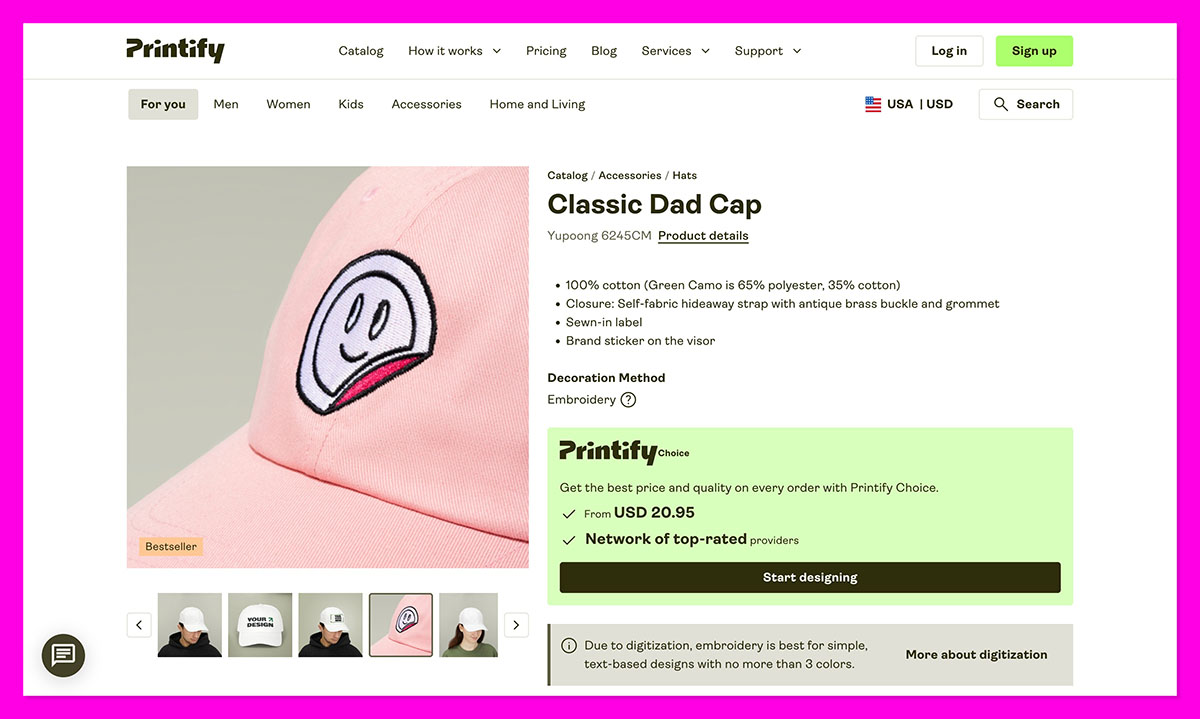
Embroidery quality is largely set during digitization, which is a one-time setup step that pays dividends if done well.
UV and 3D Printing
UV printing is used for specialty items, phone cases, and decor where direct-to-substrate printing on hard surfaces is needed. 3D printing covers niche product categories like custom miniatures, jewelry, and accessories. Quality control here revolves around adhesion (does the ink stay on the surface?), surface consistency, and color accuracy across batches. These methods reward providers who specialize rather than generalists.
Practical implication: Experienced sellers increasingly match provider to product type, using one printer for apparel, another for wall art, and a third for jewelry or tech accessories, instead of forcing a one-size-fits-all supplier to handle everything.
Supplier Selection: The First Layer of Quality Control
Supplier vetting is where quality control begins. Every decision downstream gets harder if you start with the wrong partner.
What to Screen For
A modern supplier evaluation process typically considers product catalog and blank quality, printing technology and specialization, fulfillment locations relative to your main customer regions, shipping speeds and peak-season reliability, and real-world reviews from communities like Reddit’s r/printondemand, Trustpilot, Facebook seller groups, and Etsy forums where failure patterns get aired publicly.
| Evaluation Criterion | What to Look For | Red Flags |
|---|---|---|
| Blank quality | Named brands (Bella+Canvas, Next Level, Stanley/Stella), specified GSM weight, fiber content | Generic “premium cotton” descriptions, no brand attribution |
| Print technology | Specialization in one or two methods, clear file specs, visible print samples | “We do everything” generalists with no portfolio depth |
| Fulfillment locations | Multiple regional facilities close to your buyer base | Single location far from primary customer regions |
| Production time | 2 to 5 business days stated clearly, with peak-season caveats | Vague “ships fast” language with no commitment |
| Community feedback | Consistent positive mentions in seller communities over 12+ months | Recent spike in complaints, especially about specific defect types |
| Catalog stability | Stable blank lineup, transparent communication about changes | Frequent unannounced product or substrate swaps |
Build a Multi-Provider Roster
Experienced sellers maintain a short list of preferred providers by category rather than a single relationship. Apparel might go through one printer, wall art and posters through another, mugs and drinkware through a third, and jewelry or specialty items through a fourth. This diversification is itself a quality control strategy: if one partner’s quality drops, you can shift product lines without rebuilding your whole catalog.
Re-Vet Quarterly
Even stable providers change materials, machines, or fulfillment locations over time. Sellers who treat quality control seriously re-check community reviews and seller forum threads every quarter to catch emerging patterns like increased fading complaints, new shipping damage reports, or longer production windows. A printer that was excellent 18 months ago may have quietly degraded.
Sampling: Your Primary Quality Control Instrument
Ordering samples is the only way to see what your customers actually receive. Mockups cannot reveal fabric handfeel, stitching quality, real-world print placement, color accuracy under normal lighting, or packaging presentation. Anyone who launches a POD store without sampling is gambling with their refund rate.
When to Sample
Always sample in these situations
- Every new product before launch, without exception
- Every new design on an existing product type if the design uses small typography, complex gradients, or unusual colors
- Whenever a provider changes fulfillment locations
- Whenever you switch providers or print methods for a given product
- Whenever customers report a cluster of defects (fading, misalignment, damage)
- On a fixed cadence (every 3 months is a common standard) for top-selling products, to catch unannounced changes
What to Inspect on a Sample
A proper sample review goes beyond “does it look okay.” Use a structured checklist every time so you compare like for like across providers and time.
| Inspection Area | What You’re Checking |
|---|---|
| Color accuracy | Print colors match the design file under normal indoor and natural light |
| Print sharpness | Edges are crisp, small text is legible, no pixelation or blurring |
| Placement | Design sits at correct vertical and horizontal position relative to seams and necklines |
| Fabric quality | Softness, drape, weight, no immediate signs of pilling or thinness |
| Wash test | Color retention, shrinkage, and print integrity after at least 3 standard washes |
| Stitching and seams | Even stitching, no loose threads, neat hems and cuffs |
| Packaging | Protective enough to survive shipping, branding elements present if ordered |
| Labeling | Care labels, neck labels, size tags accurate and well-placed |
Sampling is a cost, not a loss. A $25 sample order that prevents a $200 cluster of refunds and one-star reviews has paid for itself many times over. Treat the sample budget as quality control overhead, not as inventory.
Design File Standards and Print-Ready Preparation
A surprising share of “quality issues” originate in design files, not factories. A printer can only print what you give them. If your file is low resolution, in the wrong color profile, or sized incorrectly for the template, the result will disappoint regardless of how good the printer is.
Technical File Standards
Commonly used standards for apparel and most POD products include a minimum of 300 DPI at final print size to avoid pixelation, transparent PNG format for DTG and most garment prints (vector formats or high-resolution JPEGs are acceptable where specified by the provider), color modes and profiles recommended by the provider (often sRGB input that they convert, sometimes CMYK directly), and exact canvas dimensions matching the template so designs are not auto-stretched or compressed during upload.
Placement and Template Use
Misaligned or awkwardly placed designs are one of the most common aesthetic quality failures. The fix is mechanical: use provider templates and center guides to ensure correct positioning, leave sufficient safe margins from seams and edges (at least 2.5 cm or 1 inch is a typical buffer on apparel), and preview your design across the full size range from XS to 3XL because print areas scale differently on small versus large garments.
A design that looks balanced on a medium can look tiny on a 3XL or crowded on an XS.
Common file mistake: Uploading a design at the correct DPI but at a smaller canvas size than the print area, then letting the platform upscale it. The result is a soft, slightly blurry print that looks fine in mockups but disappointing in person. Always upload at the actual print dimensions.
Product and Material Choices as Quality Levers
Cheap blanks and low-grade substrates cap your quality ceiling regardless of how good the printing is. You cannot print your way out of a thin, scratchy shirt.
Upgrading Garment Blanks
Sellers who start on budget shirts (basic mass-market tees) often face complaints around stiffness, shrinkage, and poor fit. Upgrading to premium blanks dramatically improves perceived quality and reduces returns. Widely used higher-end blanks include:
- Bella+Canvas 3001: Soft, lightweight, modern fit. The default upgrade choice for most US-focused brands.
- Next Level 3600: Smooth surface with a slightly fitted cut, popular for graphic-heavy designs.
- Stanley/Stella: Premium EU-based brand with eco-friendly certifications, common in European POD catalogs.
- Comfort Colors 1717: Garment-dyed heavyweight for a vintage feel, popular in lifestyle and Americana niches.
These cost more per unit but support higher retail prices and lower churn, which makes them more profitable for brands positioned above “cheap merch.” The math almost always favors premium blanks once you account for return rate differences and review scores.
Sustainability and Quality
Consumers increasingly look for organic cotton, recycled fibers, and eco-friendly packaging, and many will pay more for products that meet those criteria. Certifications like the Global Organic Textile Standard (GOTS) provide third-party verification of organic claims across the full supply chain, which gives shoppers a credible signal beyond marketing language.
POD’s made-to-order model already reduces overproduction waste. Pairing that with sustainable materials and clear eco-labeling on product pages meets both quality and values expectations in one move. This is not a niche play anymore; it is becoming a default expectation in apparel categories.
Mockups, Presentation, and “Perceived Quality”
Even when the underlying product is good, misleading mockups erode trust and drive returns. A customer who feels the product looks different from what they ordered will rate it poorly regardless of objective quality.
Realistic Mockup Practices
Sellers with strong quality discipline avoid overly stylized, dramatic lighting or unrealistic 3D mockups that exaggerate print vibrancy or size, use flat or simple lifestyle images that reflect true print area and colors, pair generated mockups with photographs of actual samples whenever possible, and display sizing charts prominently next to product visuals to reduce “not as described” complaints.
Creating custom mockups from high-resolution templates gives more control than relying only on default platform renders. The default mockups from most POD platforms tend to oversaturate colors, which sets up disappointment when the real product arrives looking softer.
Customer Feedback as Continuous Quality Control
Customers see every production batch you ship. If you make it easy for them to report issues, they effectively become your distributed quality control department, inspecting thousands of products you will never see yourself.
Feedback Mechanisms That Work
High-performing POD brands send post-purchase emails asking specifically about print alignment, material feel, and fit (not just generic “how was your experience”), encourage photo reviews so you can visually inspect real-world output across orders, and use review apps to automate collection and display, often showing user-generated content directly on product pages to build trust with future buyers.
Using Feedback to Adjust Upstream
When recurring issues appear in customer photos (crooked prints, faded ink, inconsistent colors), the next step is to investigate with the provider and often re-order samples to verify the pattern. Feedback then triggers concrete actions:
- Switching providers for a product line if a pattern of defects emerges and persists past one or two reprints
- Updating size charts or adding fit notes if returns cluster around sizing confusion rather than print quality
- Adjusting mockups and product descriptions when customers consistently say “looks different in person”
- Revising design files if the same misalignment or scaling issue appears across multiple orders
This closes the loop between customer experience and production decisions. The brands that do this well are not necessarily the ones with the best printer; they are the ones with the tightest feedback loop.
Return Rates and Quality Analytics
Returns are a lagging quality indicator, but they are quantifiable and structured. Sellers who treat returns as data rather than just cost can pinpoint systemic issues that customer reviews alone might miss.
Categorize Returns by Cause
Using your ecommerce platform or a dedicated returns app, returns should be tagged by cause: wrong size, print misalignment, faded or poor print quality, shipping damage, “not as described,” or wrong item shipped. Analyzing these monthly or quarterly reveals patterns that drive corrective action.
| Return Cause | Likely Root Cause | Corrective Action |
|---|---|---|
| Print misalignment | Template mismatch, file sizing, printer setup drift | Re-upload file at exact template dimensions, request reprint, sample again |
| Fading or poor print | Pretreatment issues, ink quality, file resolution | Sample new batch, escalate to provider, test alternative printer |
| Wrong size or fit | Unclear size chart, blank specs inaccurate | Update size guide with measurements, add fit notes, photograph on multiple body types |
| Shipping damage | Inadequate packaging, long transit, carrier issues | Request improved packaging from provider, consider regional fulfillment |
| “Not as described” | Misleading mockups, color rendering off | Replace mockups with sample photos, calibrate color expectations |
| Wrong item shipped | Provider fulfillment error | Track frequency, escalate to provider, monitor for systemic warehouse issues |
Set Action Thresholds
Many POD operators start a deeper investigation when return rates exceed roughly 2 to 3 percent overall, or when any single defect category increases sharply month over month. Responses typically include re-uploading files or adjusting placement, requesting reprints and quality checks from the provider, and testing alternative print partners for the affected product line. Setting these thresholds in advance prevents the slow normalization of declining quality.
Setting Customer Expectations: The Soft Side of Quality Control
Managing expectations around production and shipping is as important as the physical quality itself. A great product that arrives later than promised feels like a worse product than a good product that arrived exactly when expected.
Be Transparent About Process and Timing
To reduce frustration and pre-qualify buyers, POD brands typically state production times clearly (2 to 5 business days is standard), separated explicitly from shipping times, explain that items are made to order, which can introduce minor variations and adds time compared to off-the-shelf products, and provide country-specific shipping estimates with explicit notes about peak-season delays around major holidays.
This information belongs on product pages, in confirmation emails, and on a dedicated FAQ page. Customers conditioned by next-day delivery from large marketplaces need to be gently reset to POD timelines before they hit “buy,” not after.
Position Quality as Craftsmanship
Some brands reframe small imperfections and longer lead times as part of a handmade or artisanal process, emphasizing uniqueness and sustainability. Done honestly (without hiding actual defects), this positioning supports higher price points and creates more forgiving customer expectations. It only works if the product genuinely lives up to the craft narrative; otherwise it reads as an excuse.
Operational Redundancy and Risk Management
Supplier failure is itself a quality risk. Even a perfect product is “bad quality” if it arrives three weeks late or never arrives at all.
Backup Suppliers and Mirror Listings
Serious sellers maintain unpublished mirror listings tied to alternative providers for their bestsellers. If a primary partner suffers outages, stock issues, or a sudden quality degradation, they can switch the product connection in the backend and remap designs using stored print specifications and mockups, typically organized in cloud folders by product and supplier.
This redundancy reduces downtime and avoids the emergency scramble that always seems to hit during peak season.
Multi-Region Fulfillment
POD platforms increasingly offer networks of regional print providers across North America, Europe, and Asia-Pacific to shorten shipping times and reduce damage risk in transit.
Routing orders to closer facilities improves delivery reliability and materially affects how customers perceive quality and service. A package that ships from within the customer’s country generally arrives faster, cheaper, and in better condition than one crossing borders.
Bestseller protection rule: If a product accounts for more than 15 to 20 percent of your revenue, it needs a backup provider configured and a test sample on file. Single-supplier dependency on a top earner is a business risk, not just a quality risk.
Data, AI, and Process Automation in 2026
Quality control is starting to merge with analytics and automation in POD operations. The tools do not replace physical sampling and customer feedback, but they help prioritize where to focus quality control effort.
Smart Analytics
Sellers use predictive tools to monitor product performance and detect anomalies in return rates, review sentiment, and conversion drops. These help identify when a product’s quality is silently declining before complaints reach a critical mass. A sudden dip in repeat purchases or a shift in review keyword frequency can flag a problem weeks before returns spike.
AI-Assisted Design
Generative tools speed up artwork creation and allow more structured experimentation, but they still require human quality control for legibility, color accuracy, and printability. An AI-generated design with subtle artifacts or color spaces that look fine on screen can produce visibly flawed prints. Treat AI design output as a starting draft, not a print-ready file.
Trend and Catalog Data
Tools like marketplace trend trackers show which products, materials, and niches are performing well across the industry. This data lets sellers double down on categories with fewer quality issues and stronger satisfaction patterns, and steer clear of substrates or product types that have a known reputation for inconsistency.
A Practical Quality Control Checklist
POD Quality Control Operating Checklist
Before Launching a Product
- Vet the provider via reviews, seller communities, and recent feedback
- Choose an appropriate print method for the product and design
- Prepare files at 300 DPI minimum, in the correct color profile, sized exactly to the template
- Use realistic mockups, ideally based on actual sample photos
- Order a sample for every new product or print location
- Wash-test apparel samples at least three times before launch
- Write production and shipping times clearly on the product page
After Launch
- Collect structured customer feedback through post-purchase emails
- Encourage photo reviews and display them on product pages
- Track returns by reason and watch for spikes above 2 to 3 percent
- Resample key products every few months and after any supplier change
- Review provider community feedback quarterly for emerging issues
Ongoing Operations
- Upgrade blanks where demand and brand positioning justify the cost
- Communicate production and shipping expectations transparently
- Maintain backup suppliers and mirrored listings for bestsellers
- Use analytics and trend tools to guide product and category decisions
- Document print specs, color profiles, and approved samples in a central location
Final Word: Quality Control as a System, Not a Reaction
The difference between POD sellers who scale and those who plateau usually comes down to whether they treat quality control as a system or a fire drill. Suppliers will change materials. Printers will have bad weeks. Designs will sometimes upload incorrectly.
None of those are fatal if you have sampling discipline, a backup roster, structured feedback collection, and clear thresholds for when to act. What is fatal is discovering quality issues through a wave of one-star reviews and a refund spike, by which point the damage is already cemented in your store’s reputation.
Build the system early, before you need it, and quality control becomes a competitive advantage rather than a recurring crisis.
Frequently Asked Questions
How often should I order samples from my POD supplier?
Order a sample for every new product before launch, without exception. After launch, resample key products every three months on a fixed cadence, and trigger additional sampling whenever a provider changes fulfillment locations, switches blanks, or when customers report a cluster of defects. Top-selling products warrant more frequent sampling than long-tail items.
What return rate is normal for a POD store?
Return rates in the 1 to 2 percent range are typical for well-run POD stores. Rates above 2 to 3 percent overall, or a sharp month-over-month increase in any single defect category, should trigger investigation. Categorize returns by cause (misalignment, fading, sizing, damage, “not as described”) to spot which part of your system needs attention.
Should I use one POD supplier or multiple?
Multiple suppliers, matched to product categories, is the standard approach for sellers scaling beyond a starter catalog. One printer might handle apparel best, another wall art, another mugs and drinkware, and another jewelry. This protects you against quality degradation at any single provider and lets you choose the best specialist for each product type rather than forcing a generalist to handle everything.
What file specifications should I use for POD designs?
The general standard is 300 DPI at final print size, transparent PNG for DTG and most garment prints, and canvas dimensions matching the provider’s template exactly. Vector formats or high-resolution JPEGs work where specified. Use the color profile your provider recommends (often sRGB input that they convert internally). Always check each provider’s specific file guide before uploading.
Are premium garment blanks worth the higher cost?
For brands positioned above commodity merch, yes. Premium blanks like Bella+Canvas 3001, Next Level 3600, or Stanley/Stella support higher retail prices, reduce returns from fit and feel complaints, and produce better photo reviews. The unit cost is higher, but the math typically favors premium blanks once you account for lower return rates and stronger conversion from improved reviews.
How do I handle a supplier whose quality is declining?
Confirm the pattern first with a fresh sample order, then raise the issue with the provider with specific photo evidence. If the response is unsatisfactory or the problem persists after one reprint cycle, activate a backup supplier for that product line. Maintain unpublished mirror listings with alternative providers for your bestsellers so the switch can be made without losing days to setup.
How can I prevent print misalignment on apparel?
Most misalignment issues come from file preparation rather than printer error. Use the provider’s template at exact dimensions, leave at least 2.5 cm (1 inch) of safe margin from seams and edges, and preview your design across the full size range from XS to 3XL. Always sample after any file change, since what looks centered in the platform preview can sit awkwardly on the actual garment.
Should I show real product photos or stylized mockups?
Both, but lead with photos of actual samples whenever possible. Stylized mockups oversaturate colors and exaggerate print vibrancy, which sets up disappointment when the real product arrives. A mix of clean mockups for variety and real sample photos for honesty tends to convert best and reduces “not as described” returns.
How important is fulfillment location for POD quality?
Very important, because shipping time and damage risk are part of how customers perceive quality. Routing orders to a print facility close to the customer’s region shortens transit, reduces handling, and lowers damage rates. Providers with multi-region networks (North America, Europe, Asia-Pacific) typically deliver a better overall customer experience than single-location operations shipping globally.
What’s the best way to collect quality feedback from customers?
Use post-purchase email flows that ask specific questions about print alignment, material feel, and fit, rather than generic “how was your experience” prompts. Encourage photo reviews and display them on product pages. Review apps that automate this process at scale make it sustainable as your order volume grows. The goal is to turn every customer into an informal quality inspector for the batch they received.



