
Sellfy and Shopify are two popular ecommerce platforms, but which one is better for selling print-on-demand products?
After researching both platforms in detail and testing their print-on-demand capabilities, I’ve found that Shopify is the stronger platform overall for businesses looking to grow, while Sellfy is ideal for creators who want a fast, simple way to start selling.
In this comparison, I’ll walk you through key differences between the two platforms based on pricing, ease of use, sales features, print-on-demand capabilities, and more.
Quick Comparison: Sellfy vs Shopify
Here’s a quick summary of what each platform offers for ecommerce businesses and print-on-demand sellers.
| Feature | Shopify | Sellfy |
|---|---|---|
| Best For | Growing ecommerce businesses | Solo creators and digital sellers |
| Print on Demand | Requires third-party apps | Built-in POD |
| Setup Time | Moderate (requires app installation) | Fast (10–15 minutes) |
| SEO Tools | Advanced | Basic |
| Email Marketing | Through apps | Built-in |
| Price Range | $39 to $399/month + apps | $29 to $159/month flat |
| Customization | High | Limited |
| App Ecosystem | 8,000+ apps | Very few integrations |
| Transaction Fees | Applies unless using Shopify Payments | None |
Best for Pricing: Shopify
If you’re thinking long-term and want the most value for your money, Shopify is the better choice. While its plans may seem more expensive upfront, the platform gives you more flexibility, scalability, and access to features that can grow with your business. You get built-in ecommerce functionality, professional templates, and the ability to expand your store using thousands of apps — many of which are free or low-cost.
Shopify’s three-tier pricing structure lets you choose a plan that fits your business size, and its $1/month intro offer makes it even easier to get started. As your store grows, you’ll benefit from lower transaction fees, better shipping rates, and advanced tools for managing larger product catalogs and international sales.
Sellfy has a simpler, flat-rate model that includes basic features and is great for creators or small stores with limited needs. But it comes with sales limits on each plan and fewer options to scale. If your goal is to build a serious ecommerce business, Shopify offers better long-term value, even if the initial setup takes more time and money.
Shopify Pricing
Shopify has three main pricing plans:
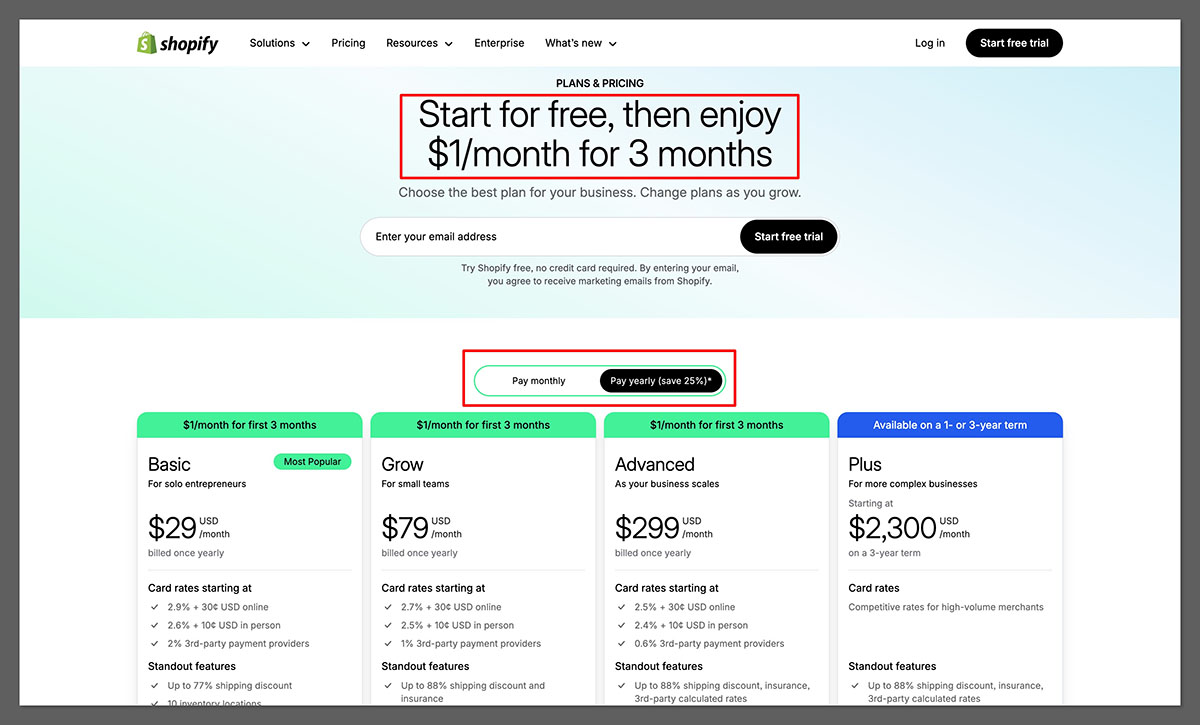
Basic – $39/month
- Full ecommerce store
- 2 staff accounts
- Unlimited products
- Basic reports
- Manual order creation
- Abandoned cart recovery
- Discount codes
- Up to 77% shipping discount
- Shopify POS Lite
- Online payments with 2.9% + 30¢ transaction fees (via Shopify Payments)
Shopify – $105/month
- Everything in Basic
- 5 staff accounts
- Standard reporting
- Lower credit card fees (2.6% + 30¢)
- International pricing per market
- Professional reports
- Better shipping discounts
Advanced – $399/month
- Everything in Shopify
- 15 staff accounts
- Advanced report builder
- Third-party calculated shipping rates
- Lower transaction fees (2.4% + 30¢)
- Custom pricing by market
- Duties and import taxes at checkout
Each plan includes access to the Shopify app store, sales channels (like Instagram, Amazon, and TikTok), and the option to use a custom domain.
Shopify also offers a 3-day free trial, followed by $1/month for the first 3 months on any paid plan (as of early 2026).
You’ll also need to factor in:
- Transaction fees (unless you use Shopify Payments)
- Additional apps for POD, SEO, email marketing, and upsells
- Premium themes (one-time fee of $100 to $350)
In reality, most stores end up paying between $80 and $150 per month once everything is added up.
Sellfy Pricing
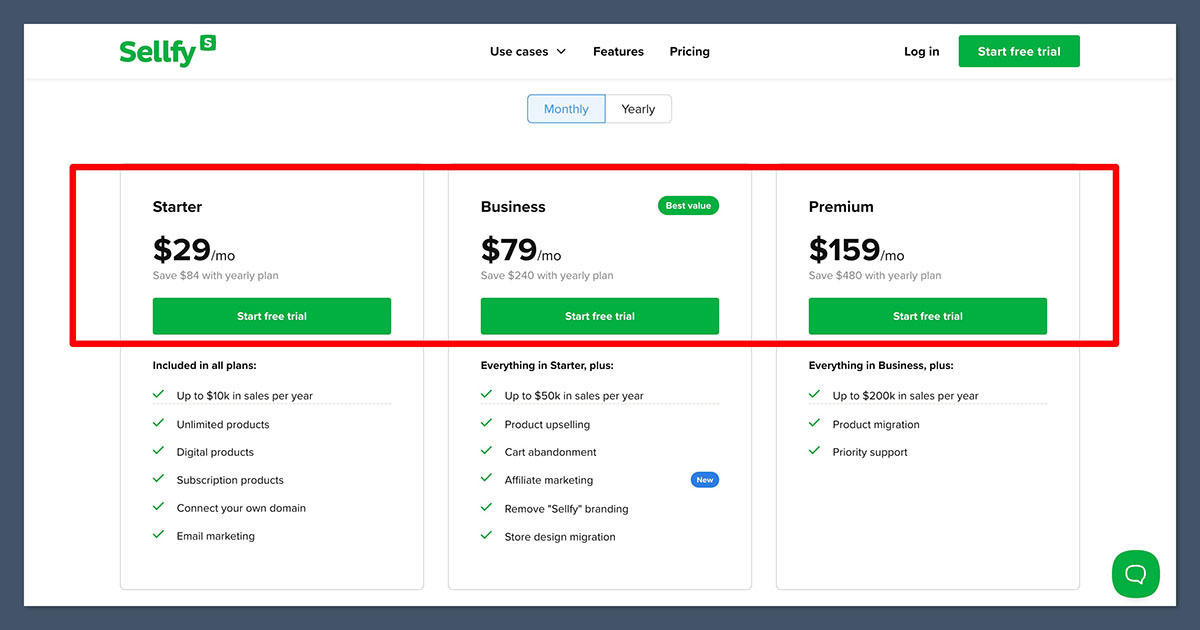
Sellfy offers flat monthly pricing with built-in features:
Starter – $29/month
- Up to $10,000/year in sales
- Unlimited products
- Sell digital, physical, subscription, and POD products
- Discount codes
- Free domain SSL support
- Store customization tools
- Built-in email marketing (limited)
- VAT and tax settings
- Accept payments via Stripe or PayPal
Business – $79/month
- Everything in Starter
- Up to $50,000/year in sales
- Remove Sellfy branding
- Product upselling
- Abandoned cart emails
- 10,000 email credits per month
- Store migration assistance
Premium – $159/month
- Everything in Business
- Up to $200,000/year in sales
- 50,000 email credits per month
- Priority support
- Dedicated success manager
- Access to advanced store features and support
All plans include access to Sellfy’s built-in print-on-demand tools and do not require third-party integrations. The email credit allowance can be used for broadcasting promotions, cart recovery, and new product announcements.
If your store exceeds the annual sales limit on any plan, you’ll need to upgrade to the next tier to continue using the platform.
There are no transaction fees and no required add-ons for core features like email or print-on-demand.
The Winner
Shopify is the better option if you’re looking for long-term value and the ability to scale your business. While it may come with a slightly higher upfront cost, you gain access to powerful features, better customization, and more flexibility as your store grows. The ability to integrate with thousands of apps, unlock advanced sales tools, and reduce transaction fees as you upgrade makes Shopify a smart investment for serious ecommerce businesses.
Best for Selling Print on Demand: Shopify
Both platforms support print-on-demand, but they offer very different experiences.
Shopify’s Print-on-Demand Setup
Shopify does not include print-on-demand out of the box, but it integrates with top providers:
- Printful
- Printify
- Gelato
- SPOD
These integrations offer:
- Wide product range: clothing, mugs, posters, phone cases, and more
- Control over branding and packaging
- International fulfillment
- Custom mockups and product personalization
You’ll need to connect a POD app to your Shopify store, but once set up, it gives you more flexibility than Sellfy.
Sellfy’s Built-In Print on Demand
Sellfy has a built-in POD feature that doesn’t require third-party apps. You can start selling right away with:
- T-shirts
- Hoodies
- Sweatshirts
- Mugs
- Tote bags
- Stickers
Setup is fast and beginner-friendly, but the product range is limited. You also don’t get control over fulfillment or branding.
The Winner
Shopify is the stronger platform if you want more product options, flexibility, and scalability. Sellfy is better if you want to start selling print-on-demand quickly and don’t need advanced features.
Best for Ease of Use: Sellfy
When it comes to getting your store online fast, Sellfy is easier to work with.
Sellfy’s Setup Experience
Sellfy is built for creators and non-technical users. From sign-up to launch, the process is smooth and requires no external tools.
You can:
- Upload products quickly
- Set up payments using PayPal or Stripe
- Choose from a clean and simple layout
- Launch in under 15 minutes
There’s very little configuration required.
Shopify’s Setup Experience
Shopify is a more powerful platform, but that comes with more complexity.
You’ll need to:
- Choose a theme
- Install third-party apps for POD, email, reviews, and upsells
- Set up shipping, taxes, and product collections
- Customize your store layout
It takes more time and technical understanding, though the onboarding process is well guided.
The Winner
Sellfy wins for simplicity and speed. If you want a store up and running today, Sellfy is easier. If you’re comfortable with a steeper learning curve, Shopify offers more in the long run.
Best for Store Customization: Shopify
If you care about design flexibility and brand control, Shopify is the better choice.
Shopify Themes and Design Tools
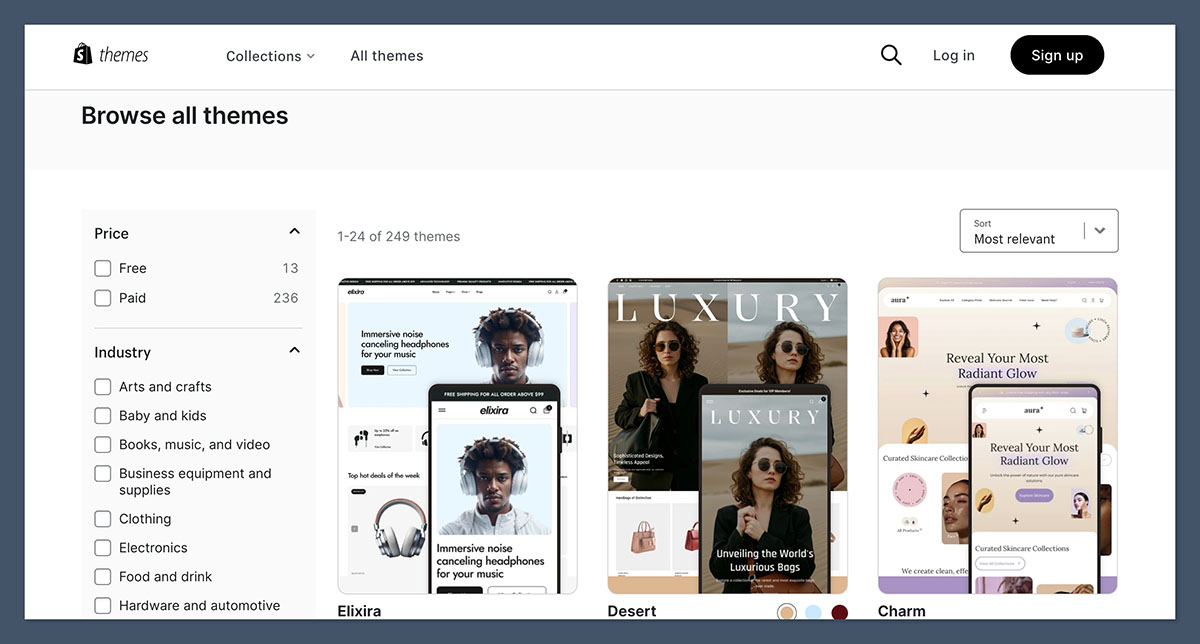
Shopify offers:
- Over 190 professionally designed themes
- Drag-and-drop section-based editor
- Mobile responsive layouts
- Full access to code (HTML/CSS) for advanced customization
- Support for animations, videos, and image galleries
This lets you create a store that reflects your brand style with far more control than Sellfy allows.
Sellfy Customization Options
Sellfy offers:
- A basic store layout
- Logo upload
- Theme color changes
- Simple navigation settings
It looks clean, but you won’t be able to create a truly unique design. All Sellfy stores look fairly similar, which can be limiting if branding is a key focus.
The Winner
Shopify gives you much more control over your store’s look and feel. Sellfy is limited but may be sufficient if your product is the main selling point.
Best for SEO and Traffic Growth: Shopify
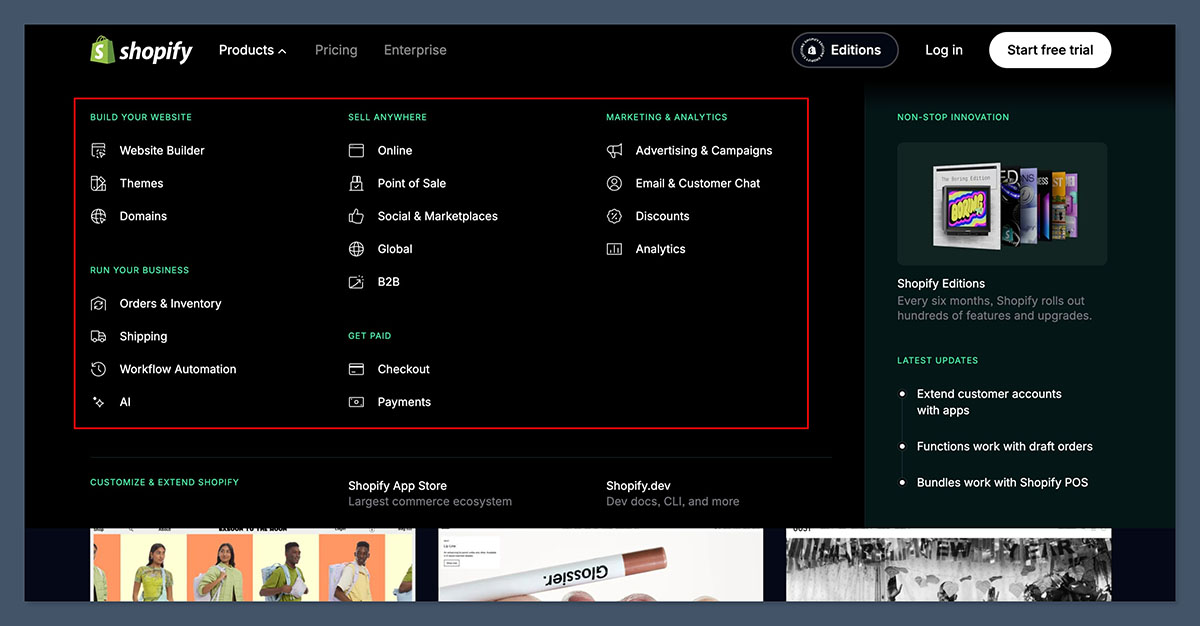
If you plan to bring in traffic from Google or grow your brand over time, Shopify is the clear winner.
Shopify SEO Tools
Shopify offers:
- Editable meta titles, descriptions, and URLs
- Sitemap.xml and robots.txt access
- Alt text for images
- Blog functionality
- Structured data via apps
- Integration with SEO tools like Semrush and Google Search Console
With the right setup, Shopify can compete with any ecommerce platform in terms of SEO capabilities.
Sellfy SEO Tools
Sellfy provides only basic options:
- Edit product and page titles
- Set custom URLs
There’s no blogging tool, limited control over metadata, and no app integrations to boost visibility. It’s not designed for long-term organic growth.
The Winner
Shopify is far more SEO-friendly. If content marketing or search traffic is part of your strategy, Sellfy will hold you back.
Best for Email Marketing: Sellfy
Both platforms offer email tools, but they approach them differently.
Sellfy Email Features
Sellfy includes built-in email marketing on all paid plans:
- Product promotions
- Broadcasts
- Abandoned cart emails
- Coupons and discounts
There’s no need to connect with an external provider. The tools are basic but functional for small stores.
Shopify Email Marketing
Shopify offers its own tool, Shopify Email, or you can use apps like:
- Klaviyo
- Mailchimp
- Omnisend
- Drip
These give you advanced segmentation, automation flows, and campaign tracking. However, many of these tools are paid and require separate setup.
The Winner
Sellfy is better for creators who want simple email tools included in their plan. Shopify is more powerful but requires extra tools and setup time.
Best for Apps and Integrations: Shopify
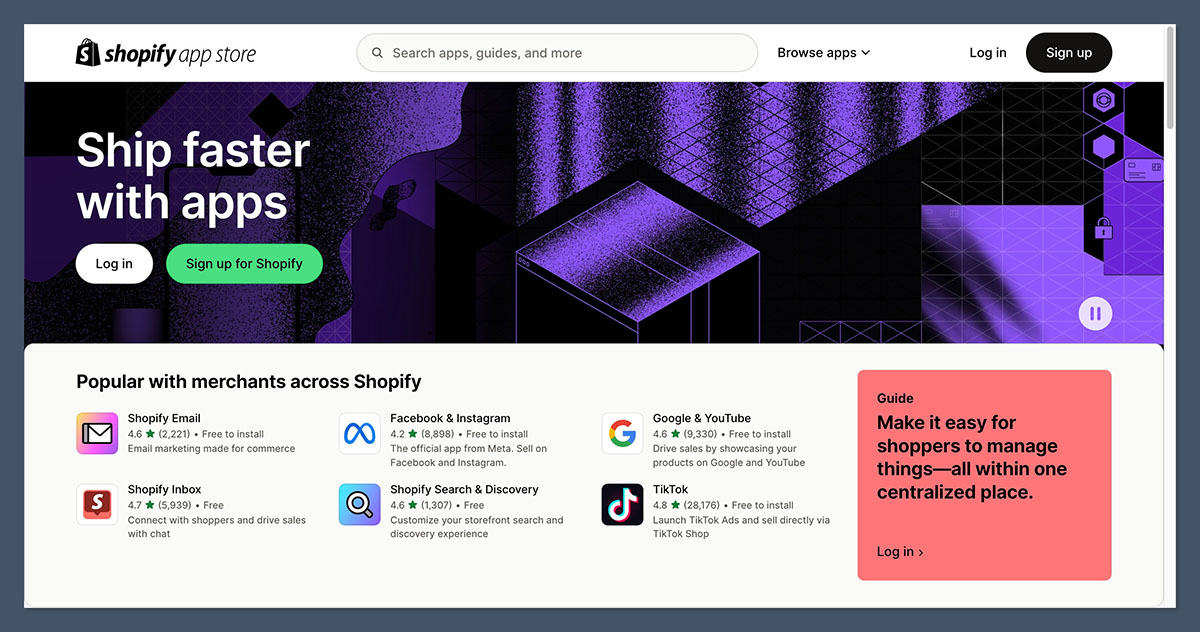
Shopify is known for its huge app ecosystem. Sellfy keeps things streamlined but limited.
Shopify App Store
Shopify offers over 8,000 apps for:
- Reviews
- Upsells
- Cross-sells
- Subscriptions
- SMS marketing
- Exit popups
- Currency switchers
- SEO optimization
Most are plug-and-play, and many are free or have low-cost plans. You can add nearly any feature you can think of.
Sellfy App Integrations
Sellfy doesn’t have an app store. It includes:
- Built-in email marketing
- Print-on-demand
- Stripe and PayPal
- Google Analytics
You can’t expand your store much beyond what’s already there.
The Winner
Shopify gives you access to almost any ecommerce functionality through its app store. Sellfy is simple but limited in features.
Best for Support and Resources: Shopify
Shopify and Sellfy both offer support, but Shopify has the larger knowledge base and community.
Shopify Support
- 24/7 live chat
- Extensive help center
- Email support
- Large active community
- Shopify Experts for hire
There are also thousands of videos, courses, and walkthroughs available for every level of user.
Sellfy Support
- Email support only
- Small help center
- Fewer tutorials or walkthroughs
Support is responsive, but the ecosystem around Sellfy is much smaller.
The Winner
Shopify has a more robust support system, more learning materials, and more ways to get help when you need it.
Final Verdict: Shopify Wins Overall, But Sellfy Has Its Place
If you’re launching a long-term ecommerce business, building a brand, or looking to scale your store, Shopify is the better choice. It gives you flexibility, power, and more growth potential.
If you’re a creator or digital seller who wants to launch quickly without fuss, Sellfy is a smart choice. It’s easier, cheaper, and built for speed.
| Choose Shopify If… | Choose Sellfy If… |
|---|---|
| You want full store control | You want to launch today |
| You need strong SEO and growth tools | You’re focused on digital or POD products |
| You plan to run advanced marketing campaigns | You don’t want to deal with apps or code |
| You want to sell on multiple channels | You’re looking for an all-in-one solution |
Both platforms offer free trials, so the best move is to try them out for yourself and see which fits your workflow.



