
When comparing website builders for selling online, Shopify and Squarespace come up constantly — but which one came out on top in our hands-on testing? After our team spent over 200 hours analyzing the best options for online stores, I can confidently say that Shopify is the clear winner if you want to sell online.
Shopify vs Squarespace: Quick Verdict
- Shopify – Best overall for ecommerce and scaling your store
- Squarespace – Best for design-led sites and creators who sell alongside content
In this review, I’ll take a closer look at why Shopify outperforms Squarespace, and compare the key criteria that your business will be most interested in, including pricing, sales features, ecommerce templates, and more.
Key Takeaways
- Squarespace’s plans start lower than Shopify’s across every tier, making it the more budget-friendly option
- Shopify takes the lead for sales features, with an optimized checkout, 100+ payment options, and 8,000+ apps
- Squarespace includes more built-in features than Shopify, reducing the need for third-party apps on simpler stores
- Shopify has stronger print-on-demand integrations, with direct connections to all major POD platforms via its app store
- Both platforms provide 24/7 help and support
A Quick Comparison of Shopify vs Squarespace Get a quick and clear overview of Shopify and Squarespace in the table below:
| Shopify | Squarespace | |
|---|---|---|
| Overall rating | 4.7 | 4.1 |
| Starting price | $29/month | $16/month |
| Free plan or free trial | 3-day free trial | 14-day free trial |
| Pros | Unlimited products, 100+ payment options, 8,000+ apps, multichannel selling, POS tools, strong POD integrations | Beautiful templates, built-in email marketing, lower starting price, native memberships and scheduling, AI SEO tools |
| Cons | Higher cost once apps are added, steeper learning curve, weaker design tools for content-led sites | Product and variant limits, weaker multi-channel options, smaller app ecosystem, no enterprise tier |
| Number of templates | 190+ | 100+ |
What Kinds of Business Is Shopify or Squarespace Best For? Have a specific business need in mind? Here’s a summary of what kinds of businesses Shopify and Squarespace are best for:
Shopify Is Best for…
- Ecommerce and print-on-demand sellers who need robust sales tools, multi-channel selling, and room to scale
Squarespace Is Best for…
- Creators, service providers, and small brands where design and content come first and selling is secondary
Best for Selling Online: Shopify
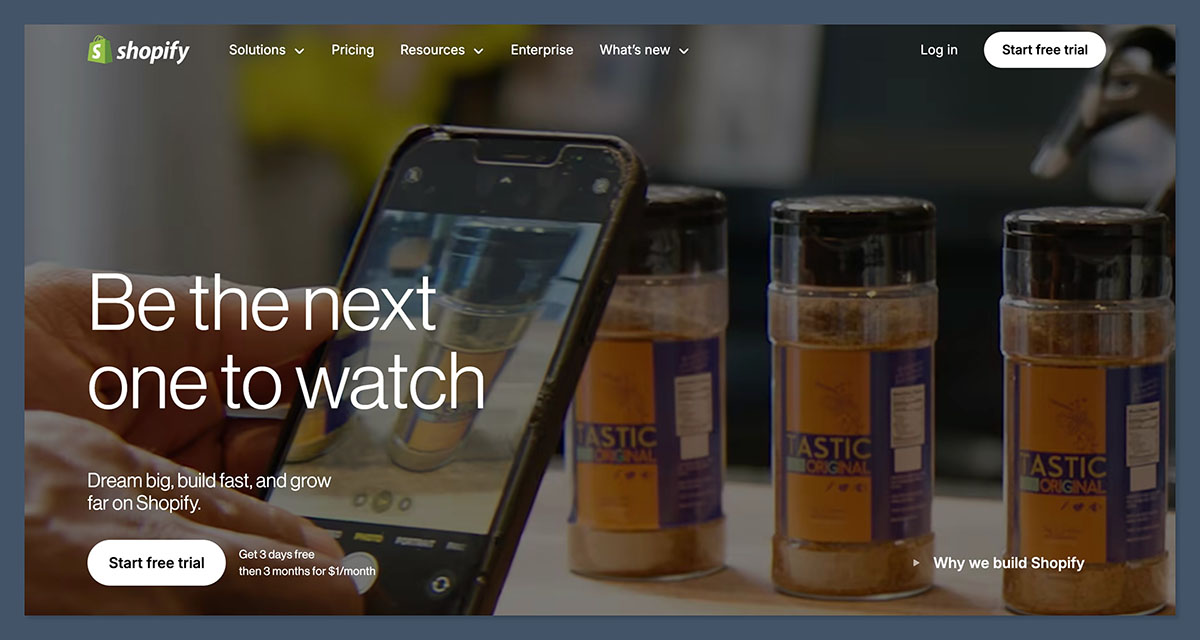
When it comes to raw ecommerce power, Shopify is in a different league. It was purpose-built for selling, and that shows in every corner of the platform, from catalog management to checkout to multi-channel selling.
Catalog and Inventory
Shopify supports an effectively unlimited number of products on all standard plans, with up to 100 variants per product and significantly higher counts on Shopify Plus with advanced configurations.
Multi-location inventory management, stock transfers, and granular stock controls make it a strong fit for stores with complex or fast-moving catalogs.
Squarespace caps out at around 10,000 products and approximately 250 variant combinations per item, with up to six options. That’s more than enough for most small and medium stores, but it’s a hard limit that product-heavy brands will run into.
Checkout, Payments, and POS
Shopify’s checkout is one of its biggest differentiators. It’s fast, highly optimized, and tightly integrated with Shop Pay, fraud tools, and a wide range of local payment methods.
For in-person selling, Shopify POS offers a mature hardware and software ecosystem used by brick-and-mortar retailers and pop-up shops alike.
Squarespace supports basic in-person selling through integrations like Square, but it doesn’t come close to Shopify’s unified online-offline retail stack. If you’re running a store that spans a website and a physical location, Shopify is the clear choice.
Multi-Channel Selling
Shopify has native integrations with Amazon, eBay, Instagram, TikTok, and other sales channels, with real-time inventory syncing across all of them. Squarespace can connect to some external channels, but typically through third-party apps that add cost and complexity, and the integrations are less reliable.
Print on Demand
For print-on-demand sellers specifically, Shopify’s app ecosystem gives you direct access to every major POD supplier, including Printful, Printify, and Gelato, with automated order routing, product sync, and fulfillment tracking.
Squarespace integrates with some POD services, but the setup is more limited, and you’ll find fewer options and less flexibility compared to Shopify.
| Area | Shopify | Squarespace |
|---|---|---|
| Product limits | Practically unlimited; ~100 variants per product (more on Plus) | Up to ~10,000 products; ~250 variant combinations per item |
| Inventory | Multi-location management, transfers, detailed stock controls | Simpler single-location inventory; fine for small catalogs |
| Checkout | Highly optimized with Shop Pay and anti-fraud tools | Good standard checkout but less customizable |
| POS | Mature hardware and software ecosystem for retail | Basic POS via integrations; not built for retail |
| Multi-channel | Native Amazon, eBay, and social channels with real-time sync | Requires third-party apps for comparable marketplace reach |
| Print on demand | Full integration with all major POD platforms via app store | Limited POD integrations with less flexibility |
The Winner: Shopify
Shopify’s ecommerce depth is unmatched for stores that need to grow. Whether you’re running a print-on-demand store, managing a complex product catalog, or selling across multiple channels, Shopify gives you the infrastructure to do it properly.
Best for Pricing: Squarespace
If you’re watching your budget, Squarespace has a clear pricing advantage over Shopify, especially at the entry level. Squarespace’s ecommerce-capable plans start lower and include more native features out of the box, which means you’ll spend less on third-party apps to fill the gaps.
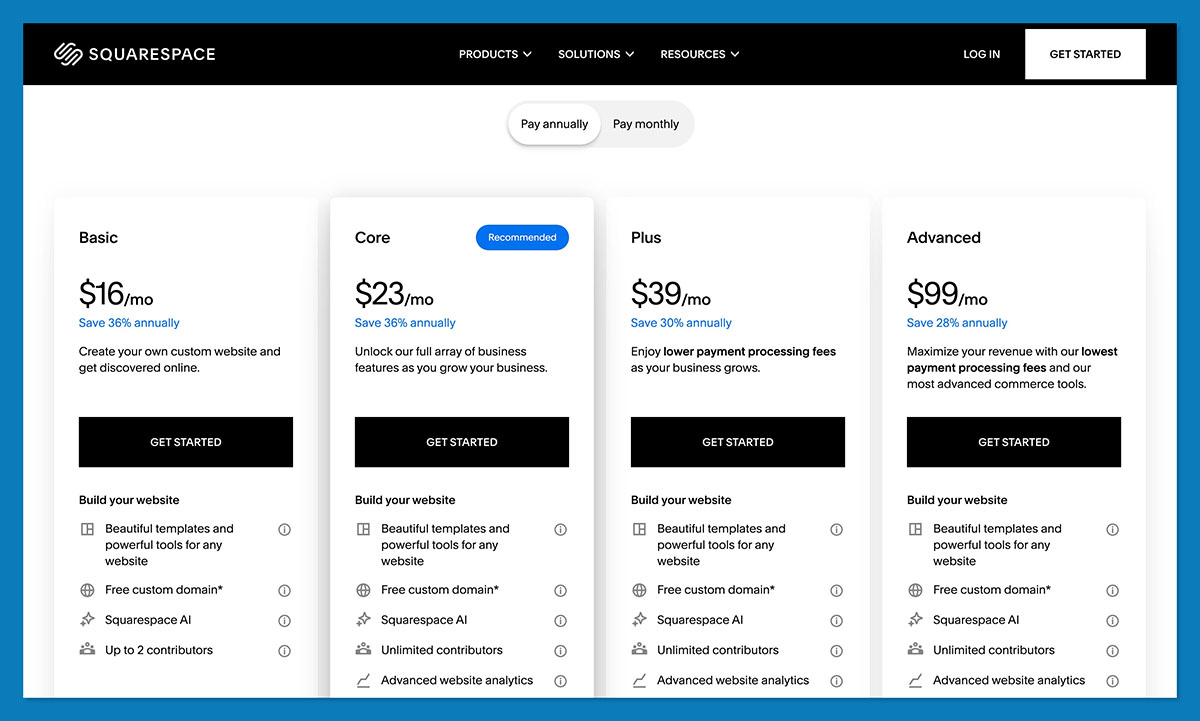
Squarespace’s current plans (billed annually) are structured as follows:
- Basic – from around $16/month
- Core – from around $23/month (the recommended sweet spot for most small businesses)
- Plus – from around $39/month, with more robust commerce tools
- Advanced – from around $99/month for growing or high-volume stores
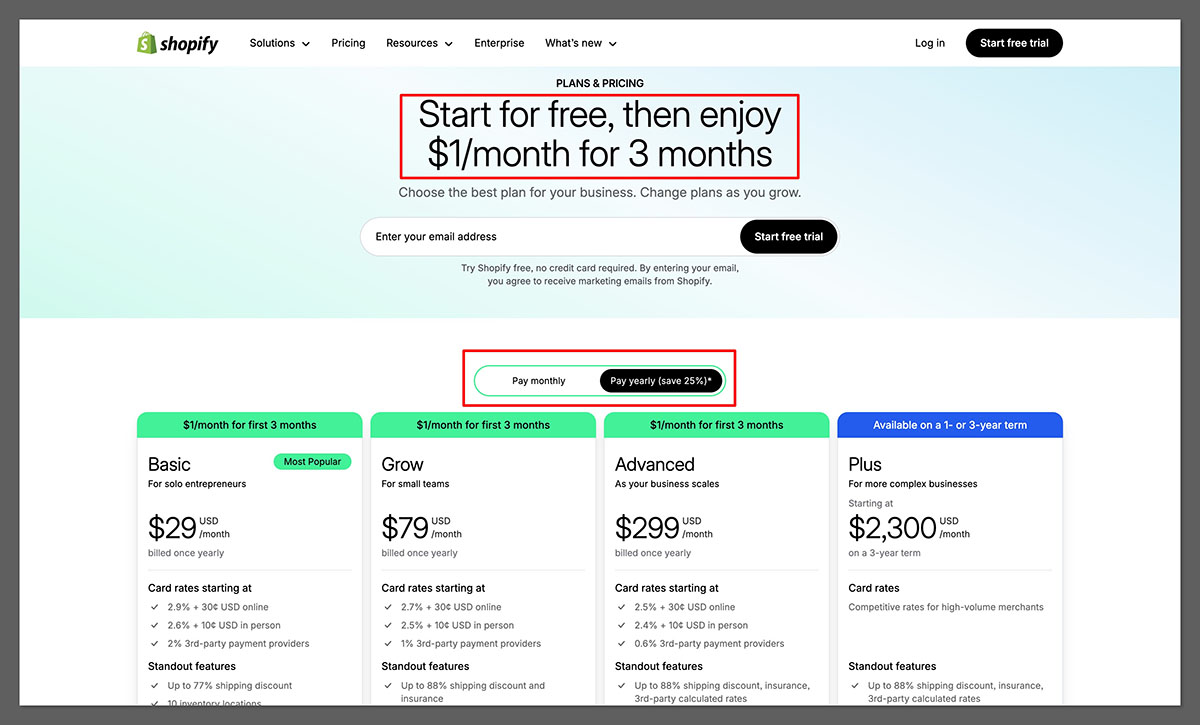
Shopify’s plans (billed annually) are:
- Basic – from $29/month
- Shopify – from $79/month
- Advanced – from $299/month
- Shopify Plus – from $2,300/month for enterprise brands
On transaction fees, Squarespace has moved to 0% store fees on Core, Plus, and Advanced plans for physical product sales. Lower-tier plans may carry a 2–3% store fee, which effectively pushes serious sellers up a plan.
Shopify charges card processing rates starting at around 2.9% + $0.30 on Basic, dropping to approximately 2.5% + $0.30 on higher tiers, plus an additional transaction fee if you don’t use Shopify Payments.
Once you start layering in apps on Shopify, the monthly cost climbs fast. A real small Shopify store covering a plan, a handful of apps, and a domain typically runs $80–$150/month or more before ad spend.
Squarespace bundles more functionality natively, from email marketing to scheduling to memberships, keeping add-on costs lower for simpler stores.
| Plan | Shopify | Squarespace |
|---|---|---|
| Entry ecommerce plan (annual) | Basic from ~$29/month | Core/Basic from ~$16–$23/month |
| Mid-tier growth plan | Shopify from ~$79/month | Plus from ~$39/month |
| Advanced plan | Advanced from ~$299/month | Advanced from ~$99/month |
| Enterprise | Shopify Plus from $2,300+/month | No direct equivalent |
| Transaction fees | ~2.9% + $0.30 down to ~2.5% + $0.30; extra % without Shopify Payments | 0% on Core/Plus/Advanced for physical products; up to 5% on digital content on lower tiers |
The Winner: Squarespace
Squarespace’s subscription pricing is consistently lower than Shopify’s across equivalent tiers, and it bundles more native features that would cost extra on Shopify. For budget-conscious sellers and small stores, Squarespace delivers better value per dollar at the entry and mid-range levels.
Best for Marketing Your Products: Shopify
Having a great store means nothing if customers can’t find it. Let’s look at how both platforms handle marketing, SEO, and getting your products in front of buyers.
Marketing Tools
Shopify comes with built-in discount tools, Shopify Email for campaign creation, and native connections to social platforms like Instagram and TikTok.
You can also install the Shopify Marketplace Connect app to sync products across Amazon and Etsy, making it straightforward to run multi-channel campaigns from a single dashboard.
Squarespace integrates email campaigns, basic automation, and membership features more tightly out of the box, which is genuinely useful for content-led businesses running simple funnels. However, for serious product promotion across channels, you’ll still need to look at third-party apps.
SEO
Shopify gives you advanced SEO controls: custom URLs, 301 redirects, meta tags, XML sitemaps, and structured data support through themes and apps. It’s a well-proven platform for SEO-driven ecommerce stores. S
quarespace recently added AI-assisted SEO tools that scan titles, descriptions, and image alt text to surface optimization suggestions, which is a nice addition for non-technical users who want to cover the basics without hiring a specialist.
International Selling
Shopify Markets handles multi-currency, multi-language, and duty and tax calculations at scale, making it the stronger choice for stores targeting international customers.
Squarespace now supports automatic VAT calculation at checkout and basic international tax handling, but it doesn’t match Shopify’s depth when it comes to market-level configuration for cross-border commerce.
The Winner: Shopify
Shopify’s built-in features and large app store make it easier to promote your products across multiple channels and markets. For ecommerce and print-on-demand sellers who want to grow, the marketing infrastructure is meaningfully stronger.
Easiest to Use: Squarespace
Both platforms are accessible to non-technical users, but they take different approaches to the editing experience, and that shapes how easy each one actually feels in practice.
Squarespace uses a section-based editor that feels intuitive almost immediately. The focus on visual presentation, clean typography, and image handling makes it feel like a design tool as much as a website builder.

For users who want to build something beautiful without a steep learning curve, Squarespace is the faster path.
Shopify’s interface is straightforward and well-organized, but it introduces a lot of ecommerce-specific concepts early: collections, shipping profiles, tax settings, discount logic, and more. That depth pays off when you’re scaling, but it does create a steeper initial learning curve for users who just want a simple store up and running quickly.
Onboarding also differs. Shopify walks you through a setup checklist that covers the key steps to launching a store, which is helpful if you’re new to ecommerce. Squarespace’s onboarding is lighter but gets you into the editor faster, which suits users who want to start designing immediately.
The Winner: Squarespace
For beginners and visually oriented users, Squarespace is the easier platform to get started with. The editor is more intuitive, the learning curve is lower, and the design tools feel more natural for non-technical users.
Best Templates and Design: Shopify
Shopify’s theme library is extensive, with more than 190 themes covering a wide range of industries, and that number grows significantly when you factor in third-party themes available outside the official store. Since Online Store 2.0, the themes are also highly customizable, giving merchants a lot of control over how their store looks and feels without touching code.

A standout example is the Horizon theme, Shopify’s flagship free theme that launched to wide praise for its modern design, fast performance, and deep customization options. It’s a strong sign of where Shopify’s design direction is heading — and it rivals the aesthetic quality that Squarespace has traditionally been known for.
Here’s what you can do with Shopify’s theme editor:
- Rearrange and reorder sections across any page
- Add, remove, or swap content blocks within sections
- Customize fonts, colors, and spacing globally or per section
- Preview changes in real time before publishing
Squarespace has a strong design reputation and its templates are genuinely polished. That said, the library is smaller and customization options are more restricted. Here’s how the two compare at a glance:
Shopify templates:
- 190+ themes in the official store, plus thousands of third-party options
- Includes Horizon, a free flagship theme with modern design and deep customization
- Paid themes range from $100 to $500 as a one-time fee
- 13 free themes available
- Highly flexible section-based editor
Squarespace templates:
- Smaller library of free and paid templates
- Strong out-of-the-box aesthetic for content-led and service businesses
- Less customization depth compared to Shopify
The Winner: Shopify With a larger theme library, a flagship free theme in Horizon, and a section-based editor that gives merchants genuine control over their storefront, Shopify is the stronger choice for building a store that looks exactly the way you want it to.
Best for Business Support: Shopify
Both platforms offer solid support options, but Shopify’s support infrastructure is more comprehensive, particularly for businesses that need help quickly.
Shopify Support
- 24/7 live chat in the Help Center, with escalation to human support advisors for complex queries
- 24/7 phone support for Shopify Plus merchants
- Social media support across multiple channels including X, Facebook, and Instagram
- Extensive Help Center with guides, video tutorials, a community forum, and business courses
- Priority support reserved for Shopify Plus customers
- Email support no longer available directly
Squarespace Support
- 24/7 live chat support available across plans
- Email support with response times that vary
- Help Center with guides, video tutorials, and a community forum
- No phone support on standard plans
- Support quality is generally solid, but the resources are less extensive than Shopify’s
The Winner: Shopify
Shopify’s 24/7 live chat, extensive Help Center, and broader support ecosystem give it the edge here. When something goes wrong with your store, having reliable, fast support is valuable, and Shopify delivers that more consistently.
How We Test These Platforms
Our comparisons are based on direct, hands-on testing of both platforms, covering the areas that matter most to ecommerce and print-on-demand sellers.
We evaluate platforms across seven weighted criteria:
- Sales Features – 40%
- Website Features – 15%
- Help and Support – 12%
- Design Functionality – 10%
- User Experience – 10%
- Customer Score – 8%
- Value for Money – 5%
We test both platforms ourselves and use screenshots and real observations to back up our recommendations, not just spec-sheet comparisons.
Shopify vs Squarespace: Our Winner
For ecommerce and print-on-demand sellers, Shopify is the stronger platform overall. Its sales features, app ecosystem, multi-channel capabilities, and POD integrations make it the right choice for anyone serious about growing a product-based business online.
That said, Squarespace is a genuinely excellent platform for the right kind of business.
If you’re a creator, photographer, service provider, or small brand where design and content come first and selling is secondary, Squarespace gives you better design tools, lower pricing, and a simpler editing experience, without the complexity overhead of Shopify.
The honest answer is that neither platform is universally better. If you’re here because you want to run a proper ecommerce or POD store, go with Shopify.
If you want a beautiful site that also sells, Squarespace is worth a look, and both offer free trials so you can test before committing.



