
If you think print on demand already peaked and fizzled out, it really hasn’t. Not even close. By 2030, it’s already expected to be worth $33.6 billion, and the tools out there creators can use to bring their vision to life just keep getting better.
Look at Wix, it might not have been my go-to for POD setups a couple of years ago (even if it is one of the most user-friendly platforms out there). Now though, it has it’s own native integration with Printful, built-in AI tools, and just about everything you need to handle a growing brand.
Still, every great business starts with a solid plan of action, so this is my guide to how you can start a print-on-demand store with Wix, the fuss-free way.
How to Start a Print on Demand Store with Wix
I’m not going to bore you with definitions for “print on demand” or how it differs from running a typical ecommerce store here. You probably know all that all ready. What I will say is that Wix has become a much more valuable platform for POD sellers lately.
I mentioned the built-in Printful setup earlier, and it’s worth repeating. You can create print-on-demand products straight inside the Wix dashboard now. No bouncing between tabs.
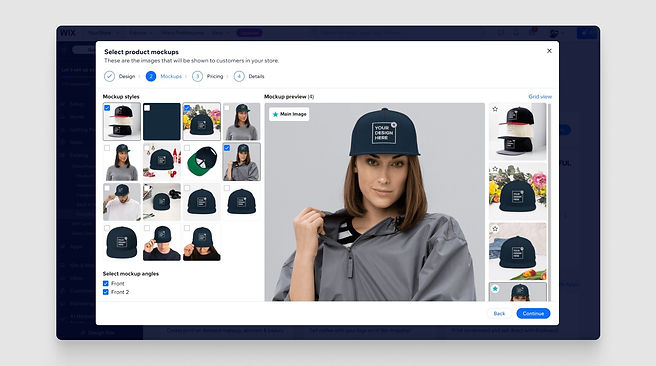
No messy syncing rituals. You pick the product, upload your artwork, adjust the mockups, set your price, and move on.
Wix even fills in the product structure and base pricing as a starting point, which saves you from staring at a blank page.
Also, even if you decided not to use Printful long term, Wix still gives you most of what you need in one place. Payments, hosting, email campaigns, automation, analytics. There are AI tools tucked in there too if you want help drafting copy. For someone starting out, that removes a lot of friction.
Step 1: Figure Out Exactly Who You Want to Sell to
I know this sounds like a generic first step for building any POD brand, but it’s still important. Choosing your niche early is how you avoid becoming one of the thousands of creators who try to design a business that appeals to everyone, and end up attracting no-one.
My advice is usually to stick with what you know. The more comfortable you are in a niche (like pet products, or sustainable clothing), the easier it is to sell yourself, and your brand.
If you’re still not sure, try checking out tools like Google Trends to see what people are interested in right now, or check out some of the guides we’ve written on best-selling POD products.
A few other handy ways to validate niches:
- Scan TikTok search suggestions. The autocomplete phrases reveal language patterns fast.
- Browse Etsy bestseller categories. What themes keep appearing?
- Read Reddit threads. Especially the complaints. Complaints are product ideas.
Start narrow to begin with, you can branch out when you find what works.
Step 2: Choose a Few Starting Products
I recommend doing this part now, because it helps you to decide what kind of print on demand vendor you’re going to partner with. For instance, if you’re interested in selling high-quality paper products, Gelato is a good pick.
Once you’re clear on who your store is for, the product ideas almost sort themselves out. People who care about sustainability aren’t hunting for neon slogan tees. They want organic fabrics, reusable drinkware, things that feel responsible. A younger crowd might lean toward oversized streetwear, small accessories, sticker packs, stuff that feels expressive but affordable.
Focus on products that:
- People already buy regularly
- Align perfectly with your niche
- Don’t cost too much to produce
T-shirts and hoodies are usually a good first step for anyone, alongside stuff like mugs and hats. You don’t need a huge catalog to begin with, just a few high-quality items. Another good tip is to think about how items might complement each other too. You can increase your margins by offering bundle deals, like shirts and sweaters that match.
Step 3: Sign Up for a Wix Plan
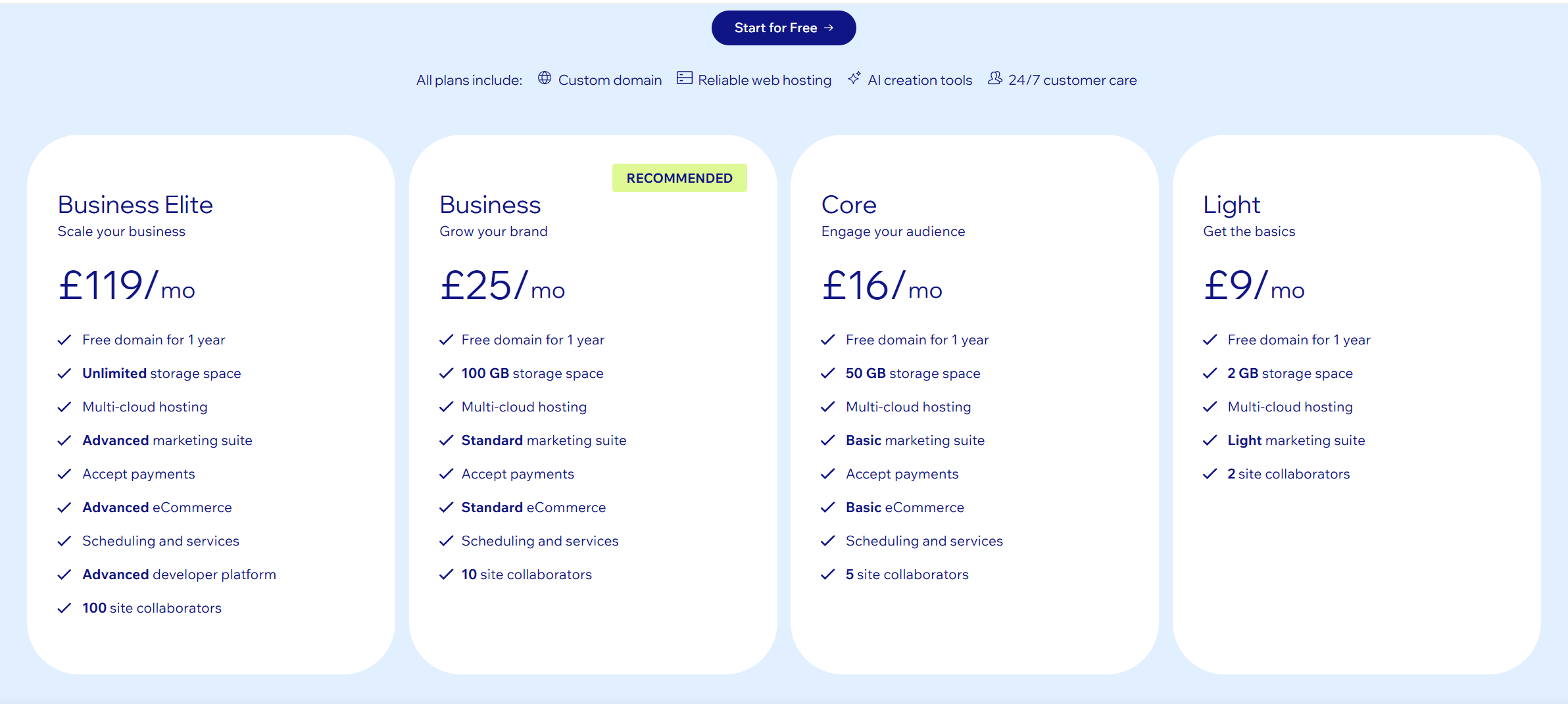
You can’t sell on Wix’s free plan, so if you’re going to run a POD store, you need a subscription. They start at about $29 per month if you want to accept payments. The basic level plan is really all you need to start with. It includes:
- Payment processing
- Custom domain
- Shipping configuration
- Tax settings
- Product variants
- Order management
You also get access to some AI-powered tools and built-in POD integrations. Wix handles email marketing, blogging, and abandoned cart emails without forcing you to bolt on five separate apps. That’s huge for creators who don’t want to live inside dashboards all day. You’re not stuck selling only through your website either. You can push products to Amazon, eBay, TikTok, Instagram and more straight from Wix.
Step 4: Connect your POD Platform
There are a couple of ways to do this. If you don’t want to use Printful as your POD supplier, you’ll need to log into Wix, go to the app market, and choose the tool you want to use:
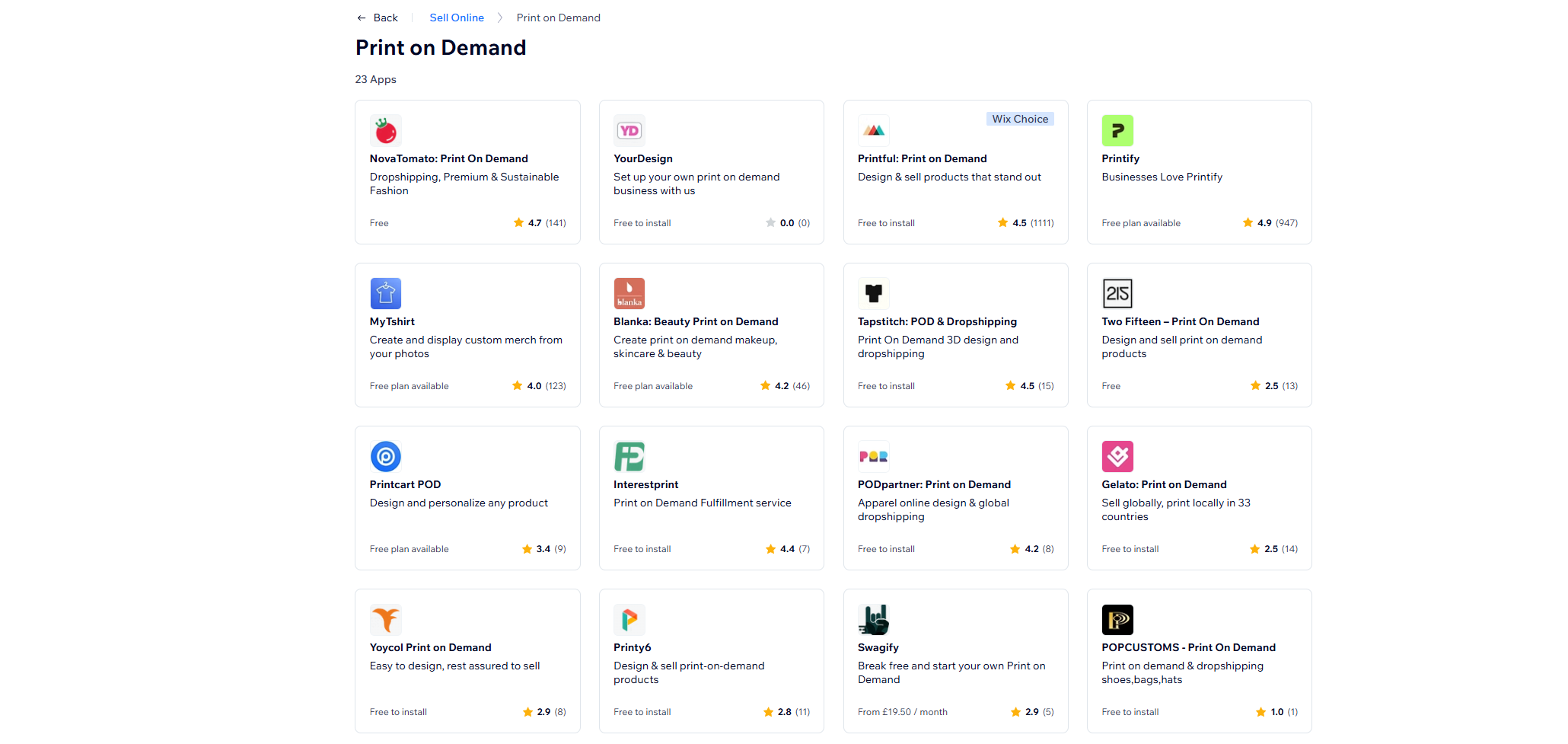
Wix will guide you through the step-by-step process for connecting the tools, and you’ll be able to make sure orders automatically sync from your store, to your provider. It’s not a difficult process, but Wix’s native integration with Printful does streamline things a lot.
All you need to do is visit the Wix.com merch maker site, and click “Get Started”. Wix will ask you what kind of products you want to sell, then introduce you to a selection of starter products taken from Printful. It recommends choosing four to begin with, which is good advice.
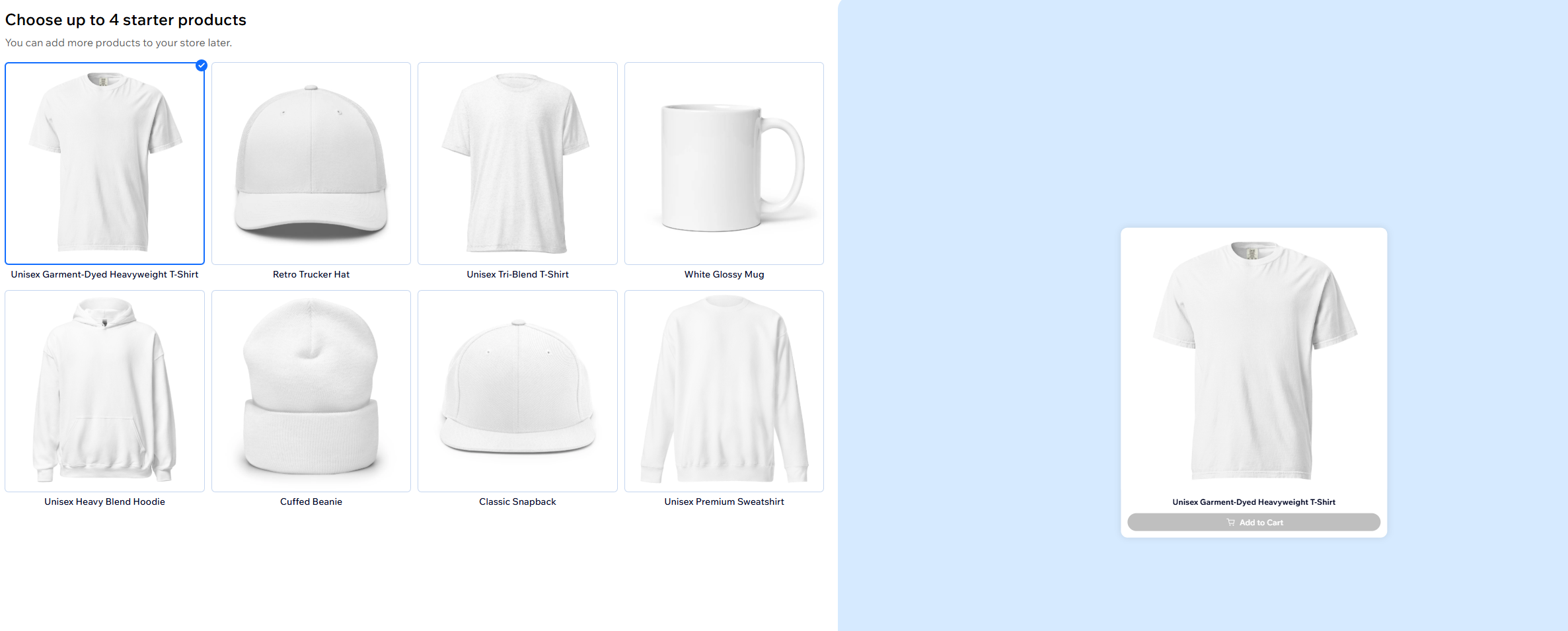
Once you pick a product, Wix asks if you want to connect your store to Printful. Confirm that, and you’re dropped right into the design interface.
Step 5: Design Your Products
You don’t need to be a professional designer. You do need discipline.
The highest-performing POD designs I’ve seen usually include the same things:
- Bold typography
- Strong contrast
- Legible from a thumbnail
- Inside references your niche understands instantly
What fails?
Overcrowded graphics. Thin fonts that disappear on fabric. Designs that look clever when zoomed in but unreadable on a mockup.
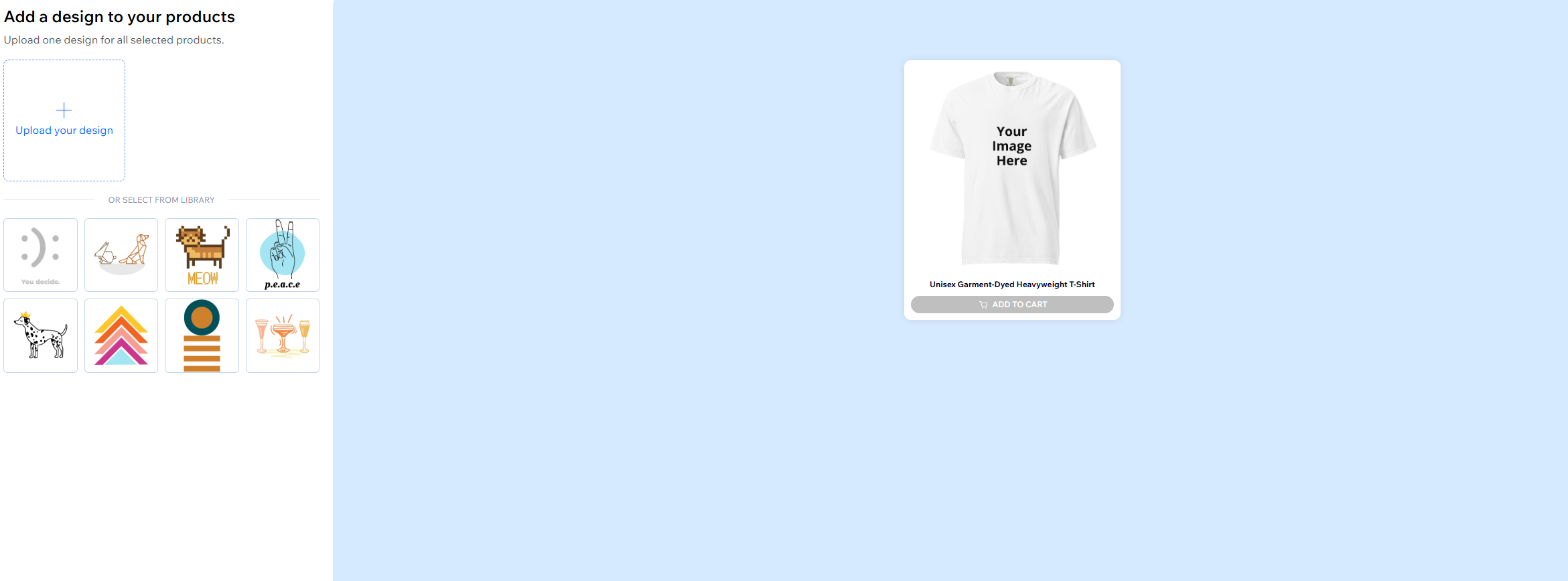
Inside Wix’s design interface, you upload artwork, adjust placement, preview mockups, and review how the design looks across variants. Always zoom out. If you can’t read it at 30 percent size, neither can a customer scrolling on their phone.
My advice to begin with is to think in collections.
A single funny slogan is forgettable. A three-piece mini-series around a shared joke feels intentional. It invites repeat buying.
Step 6: Set Pricing and Margins
Pricing is tricky for everyone. One part of your brain tells you that you need to choose the lowest price possible to boost your chances of sales. The other reminds you that you’re probably never going to make a profit that way.
Most POD sellers aim for margins between 30-50%, but it’s up to you to figure out what works. Make sure you take into account:
- Base product cost
- Shipping
- Payment processing fees
- Occasional refunds
- Marketing spend
- The cost for your time spent running the store
Now play with positioning. A hoodie priced at $49 tells a different story than one at $39. That number shapes perception whether you like it or not. If your brand feels premium, don’t undercut yourself out of nerves.
You can try dropping limited collections, offering free shipping over a certain cart value, or bundling products to increase AOV. Margins aren’t about squeezing customers. They’re about giving your business room to breathe.
Step 7: Get Samples in Your Hands Before Anyone Else Does
Printful has a fantastic reputation for delivering consistent quality, but it’s never a good idea to just “trust” your products are going to be excellent. Tiny things like color problems and print placements can ruin your whole collection. You might not see them until you look at a product in person.
Order a sample of everything you’re going to sell, and actually test it. Wash it, stretch it, check the seam quality, and track how the print holds up. Also take a few pictures. You can generate really great mock-ups with AI these days, but nothing earns the trust of your audience quite like a photo you’ve taken yourself.
Samples also double as marketing assets. You can:
- Tease launches on social
- Send items to micro-influencers
- Build pre-launch email excitement
You also (usually) write better product descriptions, because you’ve tried the item yourself.
Step 8: Finish Your Wix Storefront
Here’s where you actually shape the brand. Wix has hundreds of templates you can modify through the drag-and-drop builder, so you’re not boxed into anything rigid. If you’re short on time or patience, their AI store builder can spin up a solid foundation in minutes.
Whichever route you take:
- Build your brand in advance (create a logo and color palette)
- Ensure you have clear niche positioning on the homepage
- Create cohesive collections for your products
- Fill the product pages with useful descriptions, FAQs, and size charts
- Add honest delivery timelines, and a returns policy
- Turn on your payment system
Also, it’s helpful to have an “About” page so people can understand why your brand exists.
If you plan to scale beyond just your website, Wix supports multichannel selling. You can sync products to marketplaces and social platforms, and there’s a Pinterest integration that lets you push your catalog and run product ads straight from the dashboard. Consider switching those channels on before you go live and start marketing.
Step 9: Go Live and Promote
Before publishing, I like to have:
- At least 5–10 solid products
- Samples photographed
- An email capture form active
- A simple launch plan
- A basic blog or news page for SEO
Keep your launch small. Send it to friends. Share it in niche communities. Email the handful of people who’ve shown interest. That’s enough to get early signals.
If you want a push, offer a short-term incentive. Just don’t train your audience to wait for constant discounts. That’s a trap. Short-form video still moves the needle. Show the hoodie on someone real. Talk about why you made it. Film the unboxing. Keep it casual. Nobody wants a stiff ad.
Pinterest is quietly powerful for POD. Wix lets you sync your catalog and run product ads, which means your listings show up where people are already browsing for ideas. That’s different from interrupting someone’s scroll.
Email still pulls its weight, especially if you care about repeat buyers. A welcome message, a cart reminder, a thank you after purchase. That alone can carry a surprising amount of revenue over time. Try a few marketing angles and see what actually sticks.
Step 10: Grow With Intention, Not Impulse
Don’t sprint here. Fifty orders in a month feels exciting. It doesn’t mean you need thirty new products tomorrow. Look at what’s actually getting clicks. What’s converting. What people are talking about. Then decide what makes sense next. Do you want to:
- Add more sizes and colors?
- Introduce something new to a collection?
- Create a bundle to increase average order value?
Wix’s built-in tools make scaling less chaotic than older setups. You can:
- Trigger automated post-purchase emails
- Segment customers based on purchase behavior
- Sync products to marketplaces
- Push your catalog into Pinterest and other channels
Feel free to experiment, just do it with discipline.
Launching Your POD Store with Wix
Print on demand is still one of the simplest ways to get an online store live. That doesn’t mean it’s foolproof. I’ve watched people rush through research, skip samples, then wonder why sales stall.
Using Wix with Printful feels a lot cleaner than older POD setups. You’re not babysitting integrations. Products sync. Orders route properly. Shipping gets configured inside the same environment. That said, software doesn’t build a brand. You still have to research your audience, create designs worth buying, market them properly, and avoid scaling too fast.
Wix gives you the tools, you still bring the judgement.
FAQs
Do I need technical skills to build a POD store on Wix?
No. Wix handles checkout, security, product pages, and hosting. The Printful connection happens inside the dashboard. You upload artwork, choose products, set pricing, and publish. The hard part isn’t technical. It’s choosing a niche and pricing properly.
How much does it cost to start a POD store with Wix?
A Wix ecommerce plan that supports payments starts at $29 per month. The free plan won’t work for selling. Beyond that, your costs are simple:
- Base product cost when an order comes in
- Sample orders
- Optional ad spend
There’s no bulk inventory to buy upfront.
Is Printful the only option
It’s the built-in one. Printful powers the native Wix experience, which makes it the easiest setup. You can also connect Printify or Gelato if you want more supplier flexibility or a different product focus.
What POD profit margins should I aim for?
Most sellers tend target 30–50% margins. That amount is usually enough to cover shipping, fees, refunds, and marketing. Pricing too low feels “competitive” but kills growth.
Can I sell POD on other channels too?
Yes. Wix supports selling beyond your own site. You can connect to marketplaces and social platforms, and there’s Pinterest catalog syncing with product ads managed straight from the dashboard.
Is Wix good for scaling?
For niche-driven POD brands, yes. If you need heavy developer customization down the line, you might outgrow it. For most sellers building focused collections with built-in email and automation, it’s more than capable.



